
Jump to: Atoll · Harbor · Builder 210 · X10 · The service stacks · Control servers · WordPress and website servers · Database, download, and mirror servers · Community Server · Two stacks out in the maker community
How the pieces fit together
Dan Peters Designs has always involved making things. The tools have expanded: alongside the design, miniatures, printing, and writing, there are now workstations, servers, locally hosted software, development environments, and a growing collection of projects built with them.
The idea behind this setup is to own the equipment, understand what it does, and make good use of it. Older hardware still has useful work left in it. That repair and reuse approach runs through the whole setup. Open-source software gives us a lot to work with. Separating jobs between machines lets the household services keep running while development happens somewhere else, and lets us offer public services without opening up our private workspaces.
My build has several parts. Atoll is my main workstation and local AI/GPU machine. Harbor is the household server and storage hub. Builder 210 is the development and testing workbench. X10 is the private virtual-machine host for the AI office project. The 10x, 11x, and 12x service stacks handle website hosting, databases, downloads, reference libraries, and Community Server.
Together they give us somewhere to work, somewhere to build and test, somewhere to keep what we make, and somewhere to deliver finished services to other people.
The community stacks are the outward-facing part of that larger build. The plan is to place two of them at maker locations so local people can use the digital tools alongside the physical tools already available there. The WordPress hosting project is another way to put the equipment to work for artists and small creative projects.
The software underneath
Linux is the base across the setup. The public service nodes use Debian 13; the later workstation and private VM-host records include Fedora installations. Each machine’s applications follow its job: creative and local AI tools on Atoll, household services on Harbor, development tools on Builder, virtual computers on X10, and hosting software on the public stacks.
Docker and Compose organize many of the services and their persistent data. Nginx handles websites and reverse-proxy routes. MariaDB supports the hosting and community database workloads where configured; PostgreSQL supports separate internal applications and project records. Git preserves source and release history. OpenSSH provides administration between trusted machines, while Beszel and our rack-monitor applications show system load, storage use, temperatures, and other available telemetry.
The machines share a service LAN. The rack servers also have a separate hardware-management network for their BMC/IPMI interfaces. Tailscale provides selected private remote connections, and Cloudflare Tunnel delivers designated public websites. Public services, household applications, and internal development tools have different access arrangements.
The rest of this page follows the machines themselves: hardware and storage, installed software, assigned work, and the next steps for that part of the build.
Atoll — my workstation and local AI machine
Atoll is where I work directly: project planning, design, writing, software work, and testing local AI tools. It also supplies the GPU inference used by parts of the private X10 office project. It is a workstation that I turn on when I need it, rather than infrastructure expected to stay on around the clock.
Hardware and storage
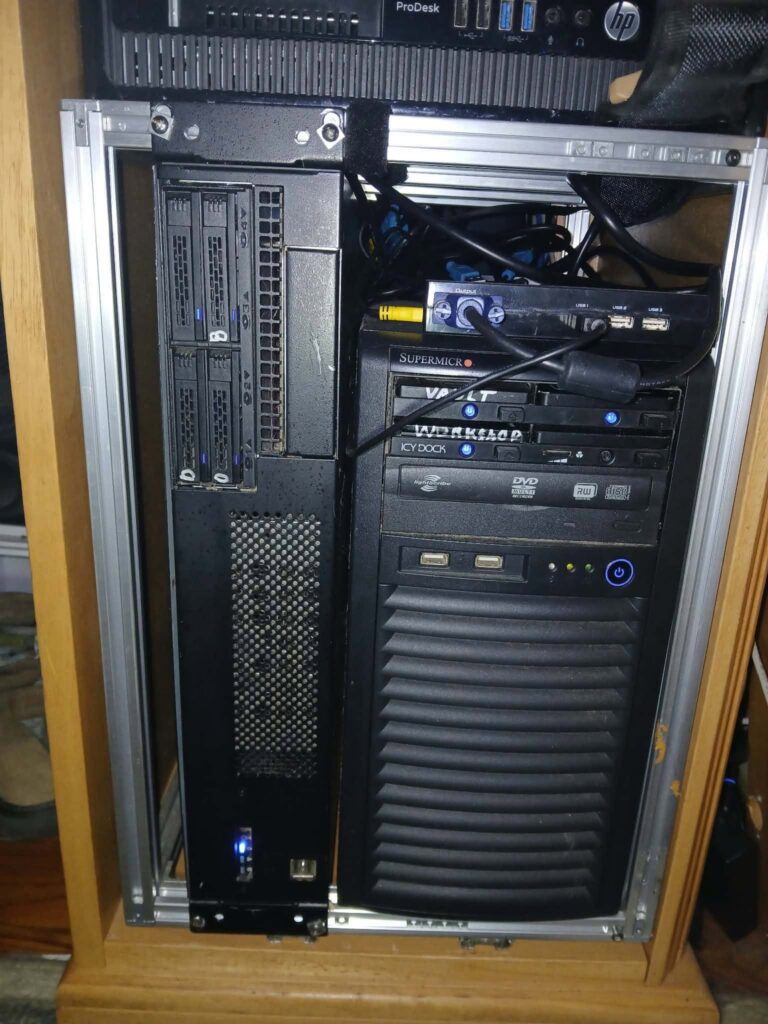
Atoll uses an AMD Ryzen 5 2600, with six cores and twelve threads, 16 GB of DDR4 memory, and an NVIDIA GTX 1660 SUPER with 6 GB of VRAM. The recorded motherboard is a Biostar A320MH.
The October 23 storage inventory records a 512 GB Mushkin OS SSD, a 512 GB Samsung Vault SSD, a 500 GB HP S700 Workshop SSD, and a 512 GB Samsung 850 PRO Beach SSD. Those volumes separate the operating system, persistent service data, active projects, and test/lab work. That inventory follows the October Fedora migration; earlier Kubuntu and smaller-OS-drive layouts belong to earlier stages of the build.
The separation is practical. Active projects should have working room, models and container data should survive a workstation OS change, and disposable testing should have an identified home. I explain that approach in The Smart Four-Drive File Architecture.
Software and assigned work
Ollama runs the local language models, using NVIDIA acceleration where a model and workload fit the available hardware. Open WebUI provides a browser interface for local model work. The model collection supports experiments in writing, code, research, and assistant behavior; downloading a model is only the beginning of checking whether it is useful for a particular job.
Docker and Portainer provide the service-management layer. Persistent container data lives on Vault. PostgreSQL and pgAdmin support internal application data and database administration. SearXNG with Valkey provides the self-hosted search service used in the local research setup.
The voice tools are Whisper for transcription and Kokoro for speech output. SillyTavern supplies a separate interface for persona and writing experiments. Those are on-demand services: they do not need to consume memory all day when their particular job is finished.
n8n is the workflow and job-automation component. Its work includes developing controlled routes from an assigned task to a local model or tool, with a recorded result. Existing media workflows and the newer agent-job work have to coexist without overwriting one another.
Atoll also hosts the X10 browser office interface, the company conversation/router services, and the local GPU endpoint used by the private office machines. That is separate from the physical X10 host: the office screen and inference service are on Atoll, while the individual virtual computers live on X10.
Who uses it and where it is headed
Atoll is my personal working machine, with authorized assistants working through the tools and project areas assigned to them. It is also where the original Addi personal-assistant work and personal continuity material belong.
The direction is to make the local tools work together reliably: useful model selection, scoped automation, voice when wanted, and clear handoffs to the other machines. The 6 GB GPU and 16 GB system memory set real limits, so heavy jobs and models need to be scheduled sensibly. We run the services needed for the job at hand.
More background: Atoll — The Workstation.
Harbor — the household server and storage hub
Harbor carries the everyday home-server work: household applications, media and document collections, shared storage, backups, and a dependable place from which to administer the other machines.
It serves the household. Its private collections, accounts, and creative applications are separate from the public Community Server installation.
Hardware and storage
Harbor’s recorded platform is an Intel Core i7-3770 with 32 GB of installed RAM—about 31 GiB reported usable in the system records.
The October storage inventory lists a 480 GB SanDisk Ultra II OS SSD, a 250 GB Samsung 850 EVO Vault SSD, a 3 TB Seagate Media drive, a 1 TB WD ResticBackup drive, a 4 TB WD Harbor-4T drive, and a separate 1 TB WD Transfer drive.
That gives household services their persistent home while keeping large media collections, backup storage, archives, and transfer space distinguishable. The 4 TB archive also holds organized hardware photographs, reports, and reference material used to document this wider build.
Software and assigned work
Harbor’s Docker/Compose service collection includes Nextcloud for private file access, Jellyfin for media, Audiobookshelf for spoken-word collections, Kavita for reading collections, and Mealie for household recipe work. The wider household application work also includes Papra, RomM, and private creative tools, with access and readiness tracked individually.
Harbor Home is the household entrance to those services. The login work aims to reduce repeated sign-ins while preserving each existing account and its files. Nextcloud and Mealie have recorded accepted browser-login improvements; the other applications retain their own login arrangements where integration remains unfinished.
Beszel monitors Harbor and connected home systems, including Atoll and X10. The rack-monitor project can combine that household telemetry with the separate rack feed. Its read-only bridge passes status information; it does not make the household databases publicly accessible.
OpenSSH makes Harbor a useful administration station. It has tested key-based access to the online home and first-away service nodes. That means working on the racks does not depend on Atoll being on. Selected remote connections use Tailscale.
Who uses it and where it is headed
Harbor is for the household and authorized administration. Its job is to make the services and stored material easy to use without turning every ordinary activity into a server-maintenance exercise.
The ongoing work is about reliable access, clearer application entry points, storage organization, and monitoring. Customer WordPress backup storage belongs on the service-stack backup tier, rather than being mixed into Harbor’s household storage.
More background: Harbor — The Home Server.
Builder 210 — development, testing, and the shared project brain
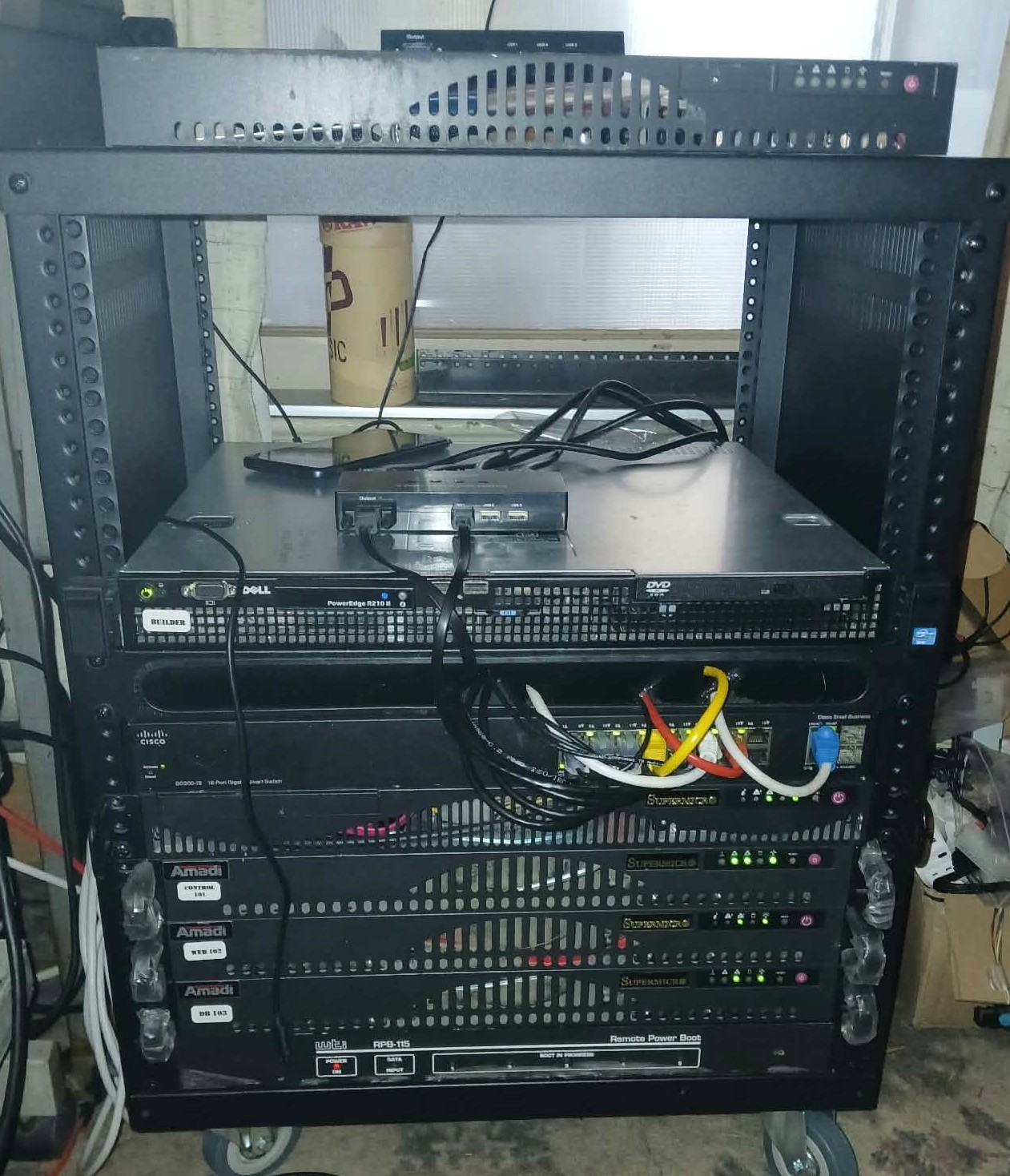
Builder 210 is the workshop where code and releases can be worked on before they reach the machines serving users.
Hardware and storage
Builder is a Dell PowerEdge R210 II with 32 GB of RAM. Its fast workspace is a 256 GB Samsung NVMe drive, providing roughly 234 GiB of filesystem capacity at /srv/builder-fast. A separate 1 TB WD SATA drive at /srv/builder-data holds lower-frequency data and archives. The OS has its own storage allocation.
The fast volume carries active workspaces and test environments. Older generated releases and staging archives can move to the data drive while the active work remains on NVMe.
Software and assigned work
Builder provides Git working copies, Python and Node tooling, Docker build environments, browser testing, and isolated virtual test machines. Community Server releases have been built and tested here before deployment onto 114. VM108 and VM109 are part of the recorded test environment; a test installation on Builder is distinct from the live Community service.
Playwright and Chromium support browser checks with screenshots and observed results. Tooling connections include the Workspace Toolbox, MCPHub, and project-specific MCP routes. These provide controlled ways for authorized assistants to inspect files, work on software, and test results.
Builder also hosts the shared Obsidian vault, amadi, and the PostgreSQL-backed conversation/project archive. That is the project brain: decisions, implementation notes, training material, source references, and handoffs. It helps the next work session continue from the actual state instead of rebuilding a plan from memory.
The machine has an Xfce desktop, Obsidian, and ChatGPT Desktop for direct use. Some monitoring-console components currently run here as well; the intended long-term production role for the service stacks remains separate from Builder’s development role.
The X10 Dispatch Office
Builder is also the home of the X10 Dispatch Office project. Its job is to act as a receptionist or telephone operator between an outside assistant and the existing local specialist offices: accept a scoped assignment, deliver it to the correct office, track its state, and make the result available for review.
The implementation uses a lightweight Python service and SQLite task records. The plan includes durable queued work, stable task IDs, receipts, retry handling, and a distinction between an agent reporting work and a human accepting the result. It is coordination software, not another creative employee persona.
Dispatch installation and connection work have progressed in stages. Its remaining integration and specialist qualification work must be completed before treating every office as a dependable task recipient.
Who uses it and where it is headed
Builder is for me and authorized development assistants. The working pattern is to inspect the existing project, change it in its workspace, test it, and send an approved release to the proper service machine. Builder keeps the development tools and shared knowledge available without becoming the permanent home of every service we create.
X10 — private virtual computers and the office project
X10 is a separate physical host for the private AI office machines. It has its own hardware and virtual-machine storage. The X10 office project spans this host, Atoll’s interface and inference services, and Builder’s documentation and dispatch work.
Hardware and storage
The host uses a Supermicro X10SLL-F motherboard, Intel Xeon E3-1230 v3, and 32 GB of DDR3-1600 ECC memory. The processor has four cores and eight threads. Networking includes Intel Gigabit Ethernet interfaces, with a separate BMC management connection.
A 400 GB Intel SSD holds Fedora and the host system. Two 120 GB HP S700 SSDs separate the AI-computer and general-VM storage areas. A 1 TB WD hard drive was present but unmounted in the hardware inventory. The display hardware is the board’s ASPEED management graphics; local GPU model inference is supplied by Atoll.
Software and assigned work
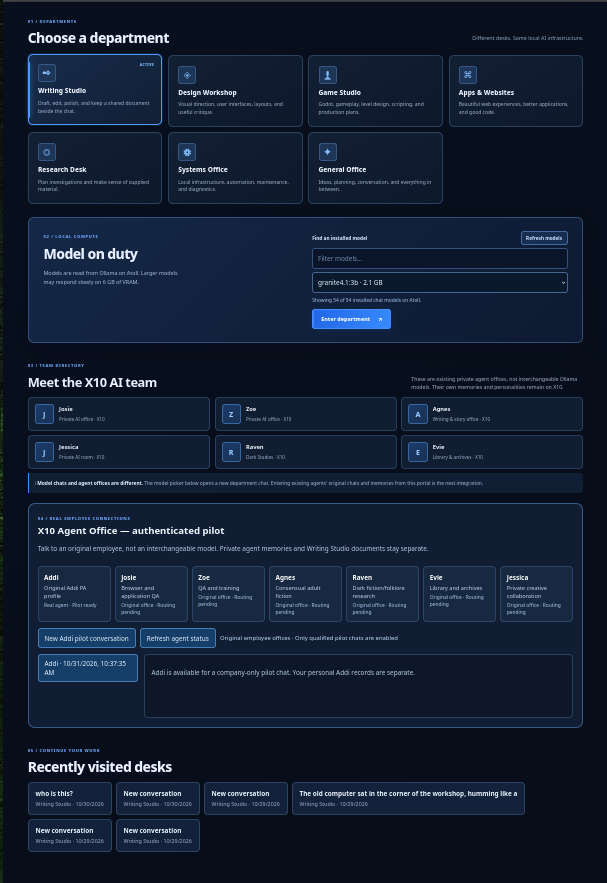
X10 runs Fedora 44 with QEMU/KVM and libvirt. Each office has a virtual working environment instead of all agents sharing one undifferentiated desktop and memory store.
Josie has the web and application-testing office. Zoe handles QA and training work. Their environments include XFCE desktops, Firefox, Chromium, Playwright, screenshot capture, and browser-control peers for bounded practice and testing.
Agnes has the private adult-fiction writing office. Raven handles dark studies and creative research, while Evie handles library, research, and archive work. Raven and Evie have distinct services and state while sharing the Agnes VM’s resources. Jessica has a separate private creative desk. Agent Lab is the general sandbox for game-development training, tool qualification, and controlled jobs.
The office work uses separate identities, saved records, and private memory areas. Reviewed training material can be shared through the company brain on Builder. Atoll provides the local model endpoint and company interface, with scoped connections between the machines.
Addi’s original personal home remains Atoll. A folder or entry in the company office registry does not move that personal history or establish a fully installed independent office elsewhere.
The office plan
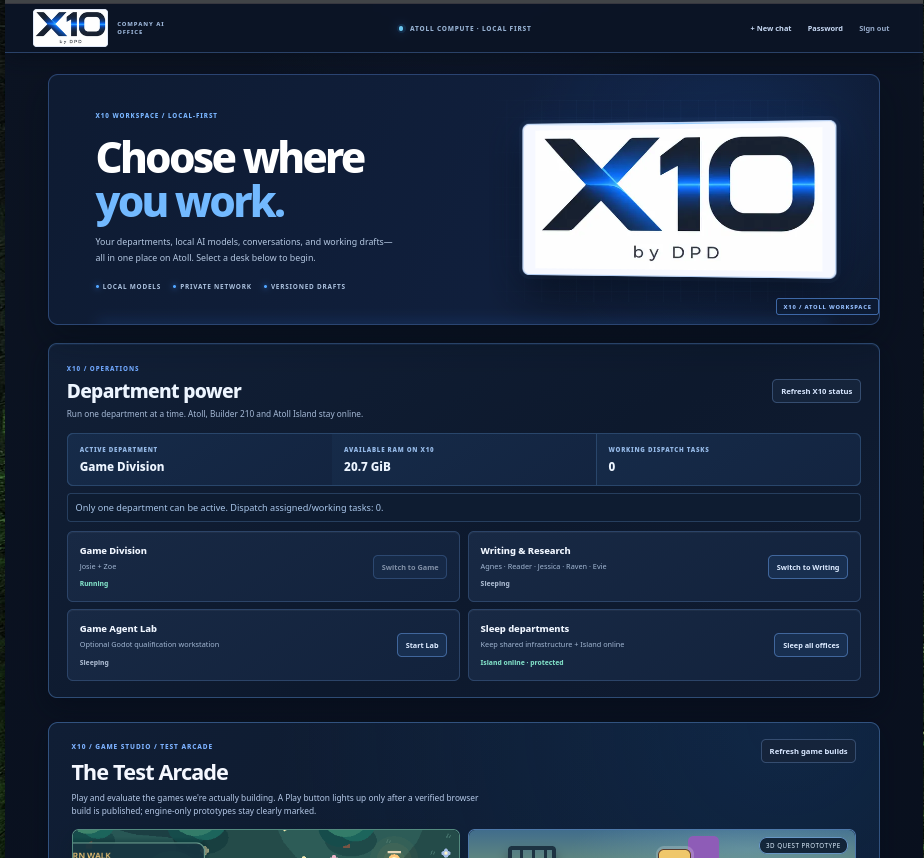
The goal is a usable local team: assign work to a specialist, let it use the tools appropriate to that job, retain the relevant context, and return something that can be checked. The dashboard should show the real state of that work.
The operating policy is one active department at a time, matching the available memory and inference capacity. The game/testing department can use Josie, Zoe, and Agent Lab; writing and research work has its own shift.
The virtual machines and several individual services exist. Unified interface connections, model-selected tool use, and independent qualification remain ongoing work. Training is demonstrated through completed tasks and retained lessons, rather than inferred from an office name.
X10 is for private DPD work and authorized collaborators. It is separate from the public Community Server and from the MT Server distribution.
The separate MT Server project has its own product scope and documentation.
The service stacks — the public-facing part of the build
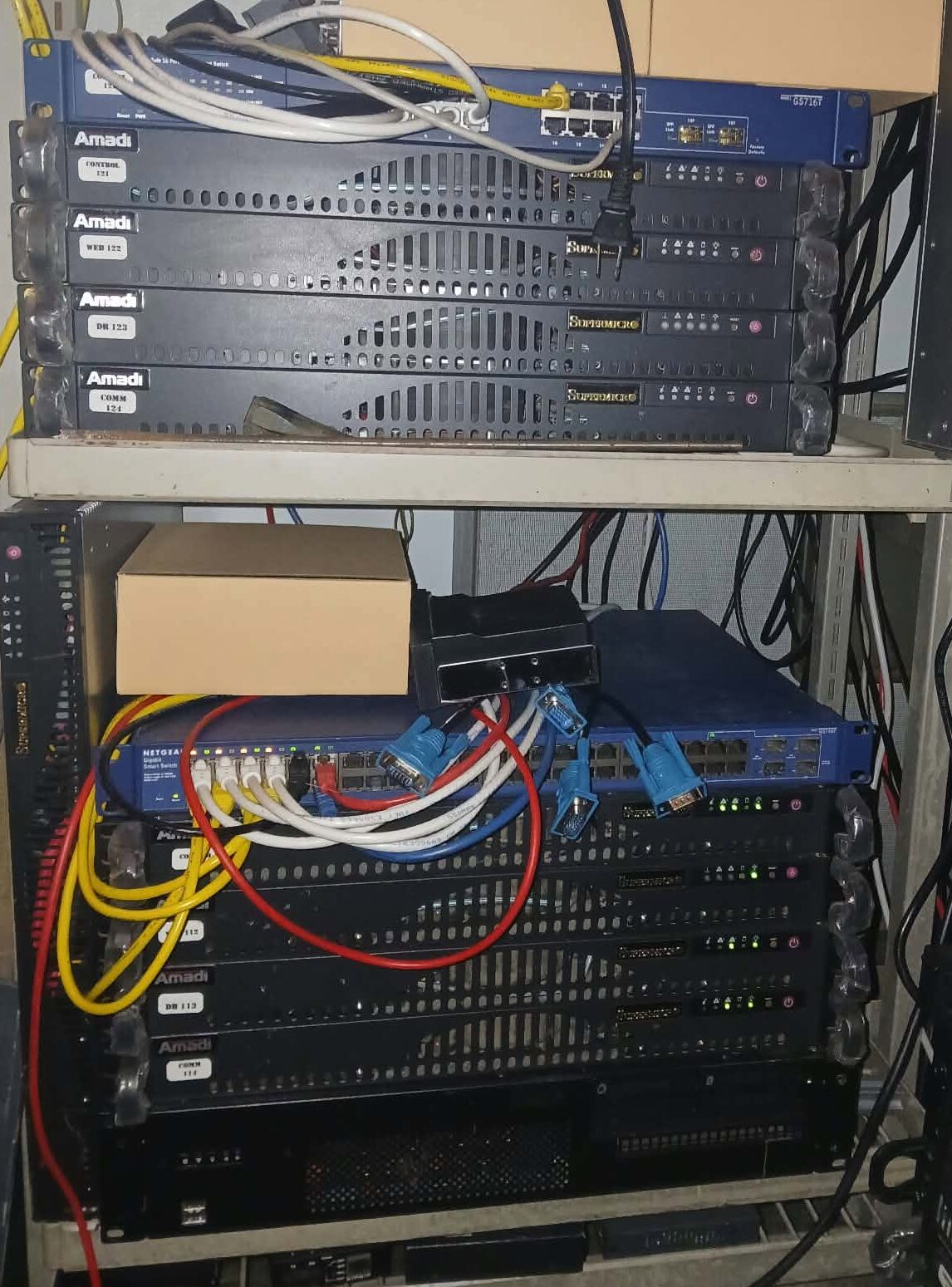
The three service groups are built around repurposed Supermicro 1U rack servers, managed Ethernet switches, dedicated service storage, and BMC/IPMI hardware management. Their Linux base is Debian 13. The home rack is 12U, so the physical arrangement and use of space matter as much as the software layout.
The 10x home stack contains 101 Control, 102 Web, and 103 DB/Mirror. It has three service nodes. There is no 104.
The 11x stack contains 111 Control, 112 Web, 113 DB/Mirror, and 114 Community. The currently deployed Community Server runs on 114, and the privately staged customer WordPress network is on 112.
The 12x stack contains 121 Control, 122 Web, 123 DB/Mirror, and 124 Community. It is the second away-stack group, with commissioning and replication work still ahead.
The layout separates stack administration, WordPress hosting, database/download storage, and community applications. The two away stacks are intended for maker locations. Their software and storage are described below by the job of each box.
Control servers — 101, 111, and 121
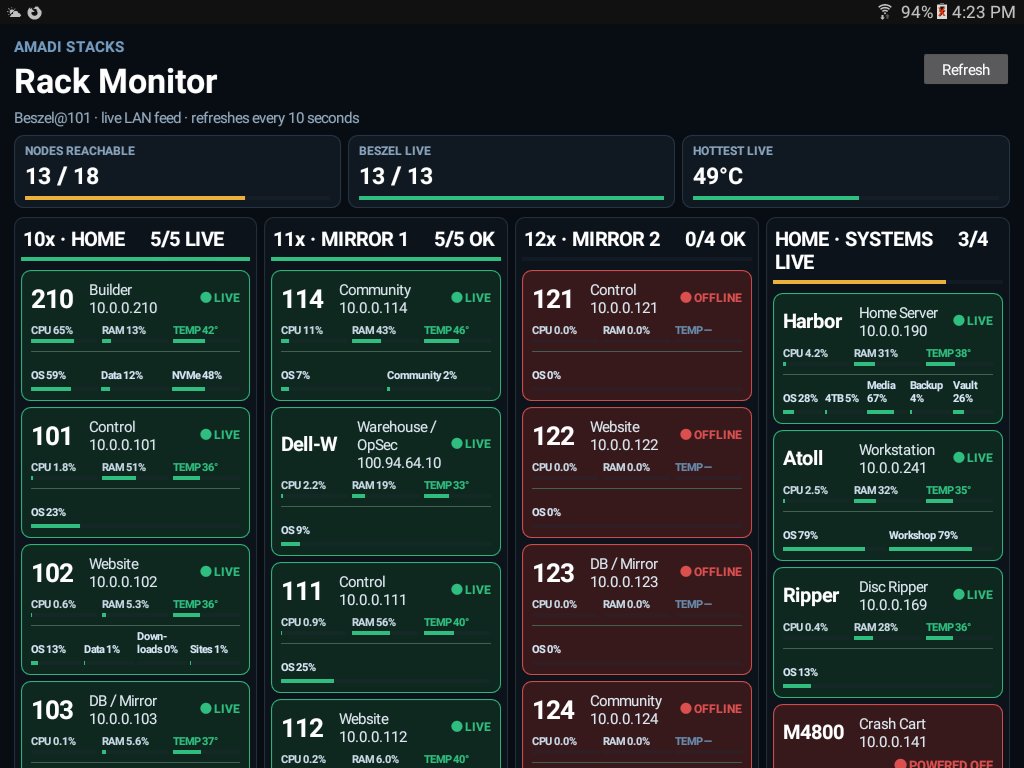
The control box is the operator’s entry point into its stack. Its jobs are collecting machine telemetry, serving the rack status feed, routing designated internal services, and providing an administration path into the servers’ separate hardware-management network.
Software and services. The documented control installation includes Debian 13, OpenSSH, Nginx, Beszel monitoring components, the custom rack-status service, and ipmitool. On 101, the custom qlink-status.service reads the Beszel data and provides /status and /detail responses for the rack-monitor clients. Those clients show CPU and memory use, temperatures, filesystem capacity, network activity, container information, and available disk-health readings. Filesystem usage and SMART health are separate measurements.
Network and hardware access. Control 111 has one interface on the service LAN and another on the isolated IPMI network. OpenSSH provides the operator’s access path; ipmitool can query and manage the servers’ BMCs. The equivalent bridge through 101 reaches the home stack’s BMCs. This makes hardware-level inspection possible independently of a target server’s normal desktop session. Power operations remain deliberate administrator actions.
Service routing. Nginx and SSH tunnels have been used on 111 to bring internal services from 114 to the control-side access point, including the Community portal and Penpot. The later public Community entrance has its own tunnel on 114; it does not depend on moving the Community application onto the control box.
Operator displays. We have a custom browser rack monitor and a native Android monitor used on a repurposed Samsung Galaxy Tab A. They consume the monitoring feeds and provide a stack overview with machine details. The browser console currently has dependencies on Builder 210, with its public tunnel on 112; completing the intended production separation is part of the infrastructure work. The dashboard provides read-only inspection; hardware power control remains a separate administrator operation.
Who uses it. These services are for DPD and authorized stack maintainers. They support maintenance, diagnosis, and planned recovery at the maker locations. Public users reach the websites and community applications through their own entrances.
101 and 111 have the documented working control installations. 121 has the corresponding role in the second away stack and will be commissioned with it.
WordPress and website servers — 102, 112, and 122
The web servers host WordPress websites: DPD’s own website, its web content and release downloads, and the separate WordPress hosting service being prepared for artists and other small creative sites.
Software and services. The current hosting work uses Debian 13, Nginx, PHP, WordPress, MariaDB, and cloudflared. Nginx serves the configured sites and routes requests to PHP/WordPress. MariaDB holds the WordPress application data where configured. Cloudflare Tunnel supplies the public connection to the locally hosted origin. Docker and Compose are used where an individual service is containerized; the documented WordPress installation also has its own host-level Nginx configuration and filesystem ownership.
Site and download storage. The web nodes separate the OS from web data. Documented mounts include Data, Sites, and Downloads, with the Sites and Downloads volumes implemented as logical loop-backed filesystems rather than three additional physical disks. The release-download collection has been served from /srv/dpd-downloads. Large archives and shared download material also belong to the DB/mirror tier described below.
The customer installation on 112. The customer service uses a separate WordPress Multisite network at wordpress.danpetersdesigns.com. It has its own web root, PHP service identity, and MariaDB database, dpd_client_multisite. DPD’s main website remains an independent standalone WordPress installation with separate files, users, and database.
The customer network is intended to let each participant manage their own site through WordPress in a browser. A customer can begin on an assigned <name>.danpetersdesigns.com address and connect a purchased domain later. Network administration manages the shared platform; each site owner manages their own pages, posts, images, and other content.
The hosting portal. Our DPD hosting plugin supplies the signup and account pages, email-verification workflow, entitlement checks, promotional-code handling, and conditional site creation. WordPress notification mail uses a customer-specific SMTP configuration. Stripe is the planned subscription billing route. Those are working implementation components under test, not a claim that open customer registration is already available.
Backups and deployment status. Local baseline backup work exists on 112. Protected WordPress backup receiver directories have been prepared on 103 and 113, but off-host transfer and isolated restore testing remain unfinished. The customer network remains behind private staging protection, with registration and site provisioning disabled and no customer sites created.
102 and 122 have the corresponding web/mirror roles in the three-stack design. The present customer deployment is on 112; distributing that service and proving recovery across the stacks is separate implementation work.
A home for artists’ WordPress sites
The WordPress hosting project grows out of the same motivation.
I love art. I love my friends. I would like to see more of them have websites where they can show their work and sell their stuff.
We’re preparing modestly priced WordPress hosting for artists and small creative projects, starting at $5 a month with 5 GiB included. There are annual and expanded-storage options, with the offer explained on the hosting page.
The plan lets a participant create and edit a site in their browser, begin with an assigned DPD subdomain, and connect their own domain later.
My responsibility is the hosting infrastructure and the shared WordPress network: the server side, HTTPS, and the centrally managed platform. The site owner’s responsibility is their own content, artwork, listings, and day-to-day site editing. Hosting does not automatically include custom website design or somebody writing and managing the site for you.
The customer network is separate from DPD’s own website and separate from Community Server.
The customer system is currently in private testing, with registration and provisioning closed. Work remains on the full onboarding journey, recovery testing, payments, and operating terms before launch.
The servers and website data are hosted on our own locally operated equipment. Internet delivery still uses outside network services, including Cloudflare, and billing uses Stripe. Owning the servers doesn’t mean pretending the rest of the internet isn’t involved.
Database, download, and mirror servers — 103, 113, and 123
These boxes were assigned to the database and download-mirror job. They provide both the application data behind the services and storage for files people come to download—including space intended for clients’ own downloadable releases and materials.
A hosted site needs somewhere for its records to live, and a client publishing a ZIP archive, software package, manual, or other downloadable file needs somewhere for those bytes to live. The DB/mirror tier supports those two different storage needs. Client download publishing is part of the intended hosting architecture; its customer-facing upload, quota, and publishing workflow still needs completion.
Database software and actual workloads. MariaDB runs on the DB nodes. A documented working example is the Nextcloud database on 113, used by the Nextcloud application on 114. The October migration copied and compared 134 tables from 103 to 113 before pointing the application at 113. The DB-node records also include Snipe-IT inventory application backup work on 113. That does not establish a fully commissioned public inventory service.
The new customer WordPress database dpd_client_multisite is currently on 112. Penpot’s database and cache dependencies are part of its Community application deployment.
Downloads and reference library. The Downloads page and MT Open Knowledge Library are the public entries to published releases and collections. Nginx serves the library from the mirror tier. The documented collection includes books, courses, manuals, and Kiwix material under /srv/mirror/library; the October 113 audit recorded roughly 216 GiB of library content. This gives the stacks a locally stored resource collection as well as database capacity. Public download paths, local library access, and private backup directories have separate purposes and permissions.
Mirror storage. The DB nodes’ main mirror tier is approximately 2 TB marketed capacity, appearing as about 1.8 TiB in the recorded filesystem reports. /srv/mirror contains library and public/incoming areas alongside private database backups. WordPress backup storage has its own protected namespace so DPD’s standalone site and customer Multisite backups can remain distinct.
The mirror is intended to carry copies between stacks for distributed availability and recovery. Current evidence includes independently generated DB backups and a verified one-time Nextcloud database copy. Continuous synchronization and unattended failover have not yet been demonstrated. Existing unique data and independent backups must be preserved as replication is completed.
Source repositories. 103 holds the canonical private Community source repository, with a verified Git mirror on 113. Builder 210 uses working copies to build and test releases. The repository preserves the source and release history; the web and Community nodes serve the approved results.
103’s separate software archive. Alongside its main mirror filesystem, 103 has an approximately 916 GiB software-library filesystem. It contains operating-system installers, VM images, utility bundles, Android packages, reference tools, and source-project archives. This is an additional archive on the same physical 3 TB disk as 103’s mirror partition, not an independent hardware backup. It is currently unmirrored and is separate from the planned recurring WordPress backup destination.
Who uses it. Visitors use the permitted download and library services. Hosting clients are intended to use allocated download storage through the completed publishing workflow. Nextcloud and other applications use their assigned databases. Maintainers manage the private repositories, backups, replication, and recovery. 123 carries the matching DB/mirror role in the second away stack, with that stack’s commissioning still ahead.
The Community Server box: the public digital workshop
The fourth-role machines—114 and 124—are where the Community Server project belongs.
114 is the deployed Community Server. 124 is the intended second installation and mirror target. There is no separate 104 in the home stack.
This is the part designed most directly for community use: games, learning, creative tools, sharing, and everyday software through a common browser entrance.
Its intended users include artists, makers, students, families, hobbyists, and people who simply need a useful tool for an afternoon.
Community Server: what can you actually do?
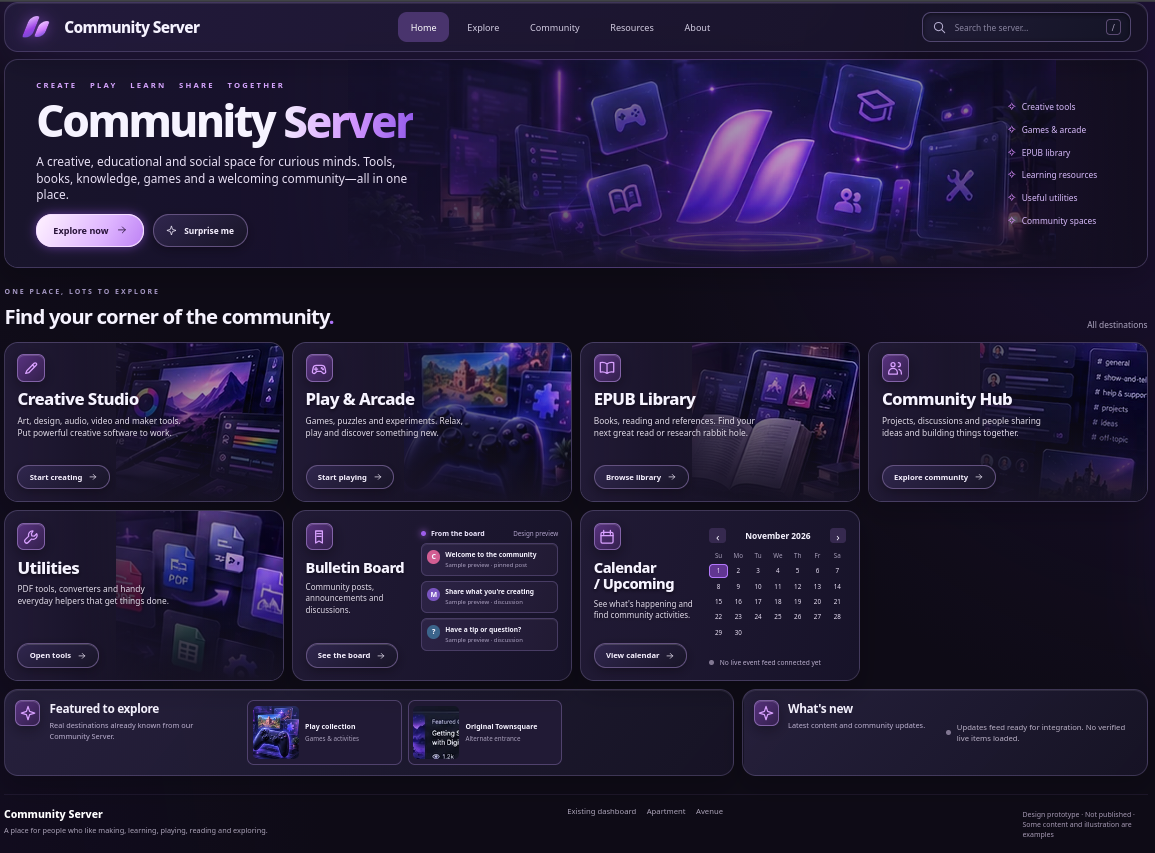
The Community Server project brings several kinds of activity together. The aim is to let people arrive with an ordinary browser and find something worth doing.
Access depends on the tool. Some features are open to public visitors. Others need an account, an invitation, or access through a participating location. An application being installed does not mean it is ready for unrestricted public use.
Play
The public Play area brings together browser arcade games, puzzles, quizzes, and learning activities, including Whimsy content.
You can take a break, challenge yourself, try something unfamiliar, or give a child something more interesting to explore than another endless feed.
Games belong here because play belongs in a community space. Everything doesn’t have to produce an invoice.
Learn
The learning side connects games, quizzes, and reference material with the broader goal of making knowledge easier to reach.
A maker might be exploring a new subject. A student might want practice. Somebody else might just be curious.
Locally stored resources can also reduce dependence on repeatedly downloading the same material. Offline usefulness varies by application and content; an internet connection is still necessary for remote visitors and for features that depend on outside services.
Make
The creative side is being built around real applications.
The invited Creative Studio alpha includes GIMP, Krita, Inkscape, Darktable, Audacity, and Scribus, delivered through a desktop session in the browser. Together, those applications cover image editing, painting, vector graphics, photography, audio editing, and page layout.
That could mean drawing an illustration, preparing a flyer, designing a logo, laying out a zine, editing a photograph, or working on an audio project.
The studio is still a limited invited alpha. Session capacity is small, and file transfer and individual application workflows need further acceptance testing before broader access. The goal is useful creative work with files people can keep; the testing has to demonstrate that whole journey.
Other work in the Community Server project includes design and modeling tools such as Penpot, JSCAD/OpenSCAD, and Sweet Home 3D. Availability and access are being developed and verified individually.
Get ordinary things done
Sometimes the useful thing is less glamorous than a creative suite.
The project includes document and office services, PDF tools, file sharing, and practical browser utilities. Work has included Nextcloud and Collabora, Stirling PDF, PairDrop, and IT-Tools.
Those tools can support jobs such as working on a document, handling a PDF, moving a file between devices, or using a small technical utility without installing a whole application locally.
Each service needs its own checks for access, privacy, reliability, and resource use. We’re building toward a coherent collection of working tools, rather than assuming that a long application list means the job is done.
Connect with the community
The community bulletin board and calendar provide places to discover notices, activities, and events. Their integrated public pages have been deployed.
These features give the project a local purpose beyond software. A digital workshop should also help people find out what is happening around them.
Moderation and appropriate access matter here. Public browsing, submitting a notice, and administering the system are different responsibilities.
Two stacks out in the maker community
The plan is to move two stacks into maker locations, where they can serve the local maker community as shared infrastructure.
Those placements are a future step. This page is not an announcement that two partner locations are already operating.
The idea is to put digital tools alongside the physical tools people already gather to use. A maker space might have workbenches, sewing machines, printers, or woodworking equipment. A community stack could add access to creative applications, reference resources, document tools, and community information.
A visitor could work on artwork for a project, prepare a handout for a class, explore a design tool, or find a local event. Someone using an older laptop could benefit from software running on the server, within the limits of that application and the available connection.
Once placed and commissioned, the away stacks are intended to operate continuously at their locations. While they remain at home, redundant equipment can stay off when it isn’t needed.
The broader goal is to distribute useful infrastructure across the community. Independent operation, replication, recovery, and access arrangements still need to be proven as those placements develop.
What the whole build makes possible
The machines give different kinds of work their own home. Atoll is where I work and where local models get their GPU time. Harbor looks after household applications and stored collections. Builder gives us a place to develop, test, document, and hand off work. X10 gives the private assistants separate computers and an office structure. The service stacks deliver websites, downloadable material, reference libraries, and community tools.
That separation also gives the projects a path from idea to use. A tool can be developed on Builder, exercised in a test environment, documented in the shared brain, and released onto its assigned service machine. A website customer can work on their pages while the hosting and storage stay on locally operated infrastructure. A maker-location visitor can use the Community tools without being given access to the household server or private office.
There is still work ahead: finish the hosting pilot, prove backup and restore paths, complete the second away installation, qualify the local office workflows, and find the two permanent maker locations. Those steps build on the systems already here.
I want this equipment to earn its shelf space: helping us make things, helping other people make things, and giving useful hardware another chapter.
You can visit the Community Server to explore the public side, or read about artist hosting.
If you’re part of a maker location and this sounds useful, get in touch.