
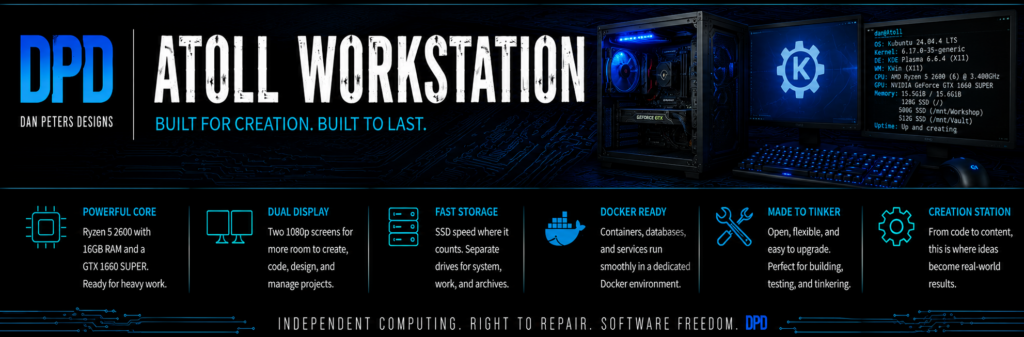
Atoll is the primary Dan Peters Designs workstation and creative shop. It is where the design, writing, development, image, website, and local AI work happens.
This page documents not only the computer’s hardware, but also its physical organization, storage layout, working structure, and the workflows built around it.
Hardware
- Processor: AMD Ryzen 5 2600
- Graphics: NVIDIA GeForce GTX 1660 SUPER, 6 GB
- Memory: 16 GB RAM
- Motherboard: Biostar A320MH
- Operating system: Kubuntu 24.04 LTS
- Displays: two 1080p monitors, connected through HDMI and DVI-D
- Audio: PipeWire with Bluetooth audio support
- System drive: 128 GB SPCC solid-state drive
- Workshop drive: 500 GB HP S700 solid-state drive
- Vault drive: 512 GB Samsung solid-state drive
- Fileroom drive: approximately 500 GB of additional storage
- Drive access: Icy Dock MB014SP-B R1 four-bay hot-swap enclosure, purchased for $75 from the Icy Dock store on Amazon and now installed and in service
Physical Structure
Atoll is built in a modified Skytech gaming case. The case was not designed around the workstation’s current storage and repair workflow, so its physical arrangement continues to evolve as better parts and better ideas become available.
The Icy Dock MB014SP-B R1 enclosure is installed and in service, providing four accessible hot-swap drive bays for Atoll.
The modification is intentionally being delayed while a better case or mounting candidate is sought. The goal is not simply to force the enclosure into the current case, but to create dependable, accessible drive storage that supports cloning, testing, repair, backups, and moving drives between systems.
Storage and File Structure
Atoll separates the operating system from active work, long-term project data, reference material, and backup storage. Each drive has a defined role rather than everything being stored in one large directory.
- System: 128 GB SPCC solid-state drive containing Kubuntu and the primary user environment.
- Workshop: 500 GB HP S700 solid-state drive mounted at
/mnt/Workshop. This is the principal active-work area for current projects and production files. - Vault: 512 GB Samsung solid-state drive mounted at
/mnt/Vault. It contains longer-lived project data, local services, Docker data, and material that needs to remain available but separate from the operating system. - Fileroom: approximately 500 GB of additional storage mounted at
/media/dan/Fileroom. It is used for reference material, collections, image organization, and files that do not belong in the active Workshop area. - External backups: removable hard drives provide offline and rotating copies of important working drives.
The names describe how the spaces are used: work happens in the Workshop, durable project material belongs in the Vault, and larger collections or reference material go to the Fileroom.
The working drives are cloned approximately once a week, as needed, to keep offline backups reasonably current.
Work Structure
The workstation is organized around the actual jobs it performs rather than around one application or vendor. Design, writing, image processing, software development, website work, local AI, repair documentation, and archival work share the same system while remaining separated into understandable working areas.
Workflows
Atoll supports several recurring DPD workflows. Each one uses the same workstation, but the tools and storage paths are chosen to fit the job rather than forcing every project into one process.
- Website work: writing, editing, site administration, asset preparation, backups, and remote management of services running on Harbor.
- Graphic design: logos, layouts, signs, printed material, icons, themes, image preparation, and promotional graphics.
- Image organization: sorting, duplicate detection, face grouping, tagging, and maintaining large reference and character-image collections.
- Software development: building and testing DPD utilities, including Linux-focused tools, local diagnostic software, and project-specific scripts.
- Local AI: running local language, image, and speech tools through Docker and related applications without making the workstation dependent on a single hosted service.
- Repair and drive work: testing salvaged hardware, checking drives, cloning working disks, documenting repairs, and preparing replacement storage.
- Backup and archival movement: moving completed or inactive work out of the Workshop, preserving important material in the Vault, and maintaining offline drive copies.
These workflows are still being refined. As individual processes become stable enough to teach or reproduce, they will be documented in greater detail on their own pages.
Cost and Supporting Equipment
Atoll and its supporting equipment were assembled gradually rather than purchased as one complete new workstation. The following prices reflect what was actually paid.
- Atoll workstation: $300 from a pawn shop
- Icy Dock MB014SP-B R1 four-bay enclosure: $75 from the Icy Dock store on Amazon
- Two Silicon Power 128 GB solid-state drives: $70 total from Amazon
- Inateck RGB SATA-to-USB 3.0 dock with offline cloning: $35 from Amazon
- D-Link eight-port gigabit switch: $24 from Amazon
- Eight-in-one hub with M.2 enclosure: $40 from Amazon
- Additional hubs and cables: approximately $50 from Amazon
Some of this equipment supports the wider DPD workshop and network rather than living permanently inside the Atoll case.
Total documented cost: $594, not including a few inexpensive USB thumb drives.
Software and Local Services
Atoll runs Kubuntu Linux with a KDE desktop and a mixture of native applications, command-line tools, and Docker-based services. The software stack is chosen around practical work, local control, and the ability to reproduce or repair the setup when something fails.
- Docker: runs local services separately from the operating system and keeps their data on the Vault drive.
- Ollama: provides local language-model service for AI-assisted writing, research, experimentation, and software work.
- Open WebUI: supplies a browser-based interface for local language models.
- Kokoro TTS: provides local text-to-speech service.
- PostgreSQL: supports local applications and development projects that require a database.
- SillyTavern: supports local character, dialogue, and writing experiments.
- digiKam: manages large image collections, tagging, face grouping, and image organization.
- GIMP: handles image editing, graphics, icon production, and manual cleanup work.
- Development tools: Python, shell scripts, local databases, editors, and version-control tools support DPD software projects.
The software list changes as projects develop. Tools are retained because they solve a real job, not simply because they are fashionable or newly released.
Still Evolving
Atoll is not a frozen showcase build. Drives, software, storage roles, and workflows change as projects develop. Those changes will be documented here rather than hidden behind a polished final-specification list.
Related Systems
Read Atoll: The Workstation Behind Dan Peters Designs for the story behind this workstation. See Harbor — The Home Server for the always-on server that carries the website and long-running services, or return to the Current Systems overview.