
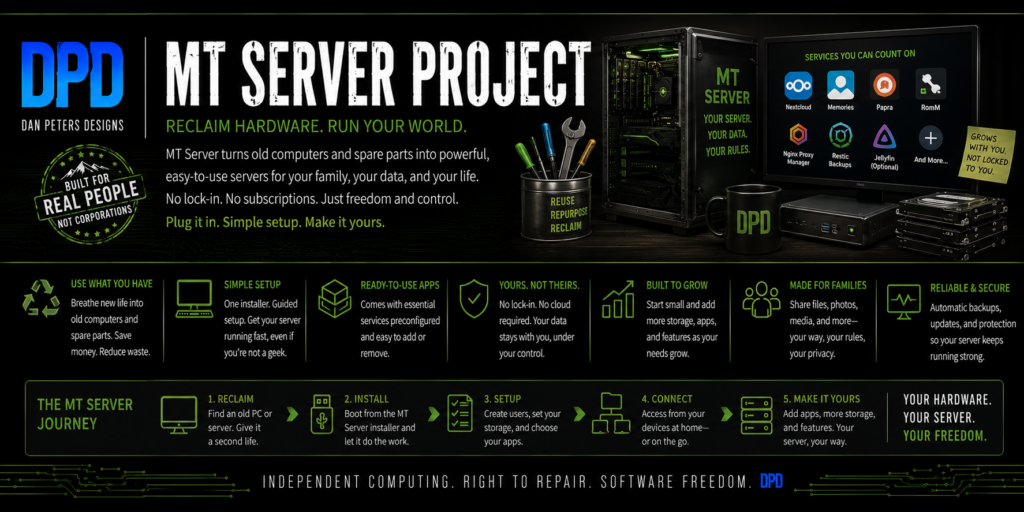
MT Server turns an ordinary computer into a private digital home for your household, school, small business, or community organization.
It gives you one place for the things people actually use every day: files, photos, documents, books, audiobooks, movies, music, recipes, calendars, contacts, learning resources, household records, games, backups, and other useful tools.
Your hardware. Your data. No subscription required. MT Server is designed to keep useful local services working even when the Internet connection is unavailable.
What Does MT Server Actually Do?
Think of MT Server as a shared digital home for the people using it. Instead of spreading everything across different cloud services, subscriptions, phones, laptops, external drives, and online accounts, MT Server brings useful services together on one computer you control.
- Store and share files.
- Keep family photos and videos organized.
- Manage calendars and contacts.
- Read ebooks and listen to audiobooks.
- Watch your own movies and media around the house.
- Keep recipes, meal plans, and grocery lists together.
- Organize receipts, manuals, warranties, scans, and household records.
- Keep useful educational and reference material available locally.
- Organize compatible game collections.
- Back up important information.
- Share useful services with people inside a home, school, club, shop, nonprofit, or other small organization.
Why MT Server?
Most people do not wake up wanting a server. They want their photos safe, their files where the family can find them, their documents organized, their media available, useful learning material for their kids, backups they control, fewer subscriptions, and services that do not become useless just because the Internet went down.
There are already excellent open tools that can do those jobs. The problem is that putting them together normally expects the user to become a Linux administrator first.
MT Server is being built to put those tools together into one understandable system for ordinary people. You choose what you want the computer to do. The complicated setup, health checks, maintenance, and recovery work stays behind the scenes as much as possible.
One Computer, Many Jobs
Files and photos: keep documents, phone uploads, photos, calendars, contacts, and shared family files in one private place.
Books and media: build your own library of ebooks, audiobooks, movies, music, home videos, manuals, and reference material and use it from devices around your home.
Recipes and household records: keep meal plans, grocery lists, receipts, warranties, manuals, scans, and other important records organized instead of scattered across drawers, inboxes, and random folders.
Learning and offline knowledge: keep supported educational and reference material locally so useful information can still be available without a working Internet connection.
Games and useful tools: organize compatible game collections and add practical services that fit the people using the machine.
Backups and recovery: protect the information that matters and make replacing a failed computer easier. The machine can be replaced. Your family or organization’s data may not be.
Built for Real Life
MT Server is local-first, open, and intended to run on compatible hardware you already own, reuse, or obtain yourself. It is not a special computer you have to buy, and it is not another proprietary cloud service moved into your house.
The goal is simple: a useful shared computer for the home or organization, with the technical details available for people who want them — but not standing in the way of everyone else.
Free software. Not a computer for sale.
Dan Peters Designs does not sell MT Server computers. MT Server is software intended to run on compatible hardware you already own, reuse, or obtain yourself. Any computer shown in project graphics is illustrative.
Current status: MT Server has completed a fully disconnected end-to-end installation rehearsal in a virtual machine with no network adapter, and the current external 64 GB alpha test USB carries both the Debian installer and MT Server payload. Automated test coverage is being maintained as development continues. Payload/readback and filesystem checks on that external test stick have passed. The next major validation step is installation on disposable physical target hardware after the final read-only media checks.
MT Server is still under active development and is not yet available for general public installation.
For People Who Want the Technical Details
You do not need to understand this section to understand what MT Server does. These details are here for testers, contributors, technical users, and anyone who wants to know how the system is being built.
One Install Stick. One Complete Catalog.
“Basic” is a default configuration — not a smaller installer, not a separate edition, and not a different USB.
The planned production MT Server release is intended to use one external USB flash drive carrying all containers and application payloads supported by that release. During guided setup, the user chooses what the server should do. Services can be selected or deselected as needed.
That means the same install stick can build a simple family server, a specialized machine focused on one job, or a broader general-purpose server. The only real limits are what that release supports and what the hardware can safely run.
Basic defaults
- Nextcloud — private files, shared folders, phone uploads, calendars, contacts, and sharing.
- Nextcloud Memories — family photo timelines and albums.
- Papra — receipts, manuals, warranties, scans, and household records.
- RomM — a family-owned game library and browser play where supported.
- Mealie — recipes, meal planning, and grocery lists.
- MT Server Home — the simple local front door to the system.
- Automatic system care — health checks, maintenance, and recovery tools work behind the scenes so users do not have to manage the technical details themselves.
Those are the services that come on by default. They are not the only services on the release media.
Application categories
Instead of forcing people to choose software by technical name, MT Server organizes available applications by what the user wants the machine to do. Current and planned categories include:
- Family & Household — files, photos, documents, recipes, household records, and shared services.
- Offline Knowledge — Kiwix is included as the engine for reading and serving ZIM files. The install media will not necessarily carry every ZIM database; space permitting, each release will try to include a useful starter knowledge set, with additional compatible ZIM databases able to be added later.
- Education — learning and school-oriented tools.
- Preschool / Young Kids — a distinct young-child area with appropriate content and controls.
- Books, Audiobooks & Media — services such as Kavita, Audiobookshelf, and optional Jellyfin where appropriate.
- Games — RomM plus supported browser/server game infrastructure.
- Creative Studio — creator tools on suitable hardware.
- Business & Organization — selectable tools for small businesses, nonprofits, and community groups.
- Website & Publishing — website hosting and related services where appropriate.
- Secure Remote Access — optional remote connectivity rather than a requirement for local use.
Any supported service can be selected or deselected. A household can keep the Basic defaults, a school can build around education and offline knowledge, a creator can emphasize media and creative tools, and a small organization can mix categories as needed — all from the same release media.
MT Server is not a proprietary container ecosystem. It uses standard Docker containers, so users are not limited to the applications included in the MT Server catalog. Other Docker containers, services, and contained applications can be added as long as they are compatible with the host hardware and operating environment. User-added containers may sit outside MT Server’s tested release catalog and automated support, but the platform is intentionally open rather than locked down.
Not every planned service is part of the currently validated Basic installation yet. The release catalog will only include services that have actually reached the support standard for that release.
Local-First and Offline-Capable
MT Server is not designed around permanent dependence on an Internet connection. Supported releases should be able to install from local media, and core local services should remain available to the people in the building when WAN access is lost.
Remote access is optional. Normal household use should not depend on a third-party cloud account just to reach files and services sitting in the next room.
Designed for Real-World Hardware
MT Server is intentionally being tested on the kinds of computers people can realistically obtain: retired office desktops, older small servers, reused storage, modest-memory systems, and machines with their own hardware quirks.
Reuse is part of the project’s purpose, but not every old computer is automatically suitable. The system is intended to inspect available hardware, explain what it can safely support, and prevent users from selecting workloads the machine cannot reasonably handle.
- Under 4 GB RAM: not a target for the complete supported server stack.
- 4–8 GB: low-memory territory that must be proven through testing and careful service selection.
- 8 GB: the current recommended normal target.
- 16 GB and above: useful headroom for larger or more specialized selections.
Disaster Recovery: The Computer Is Replaceable
MT Server is being designed so the physical server itself is not the irreplaceable part.
The planned production recovery system uses the same external MT Server installation USB plus the recommended external backup drive. That backup is intended to keep the information needed to reconstruct the environment in one place: system configuration, Docker and application configuration, accounts and permissions, required application state, and the user files and media selected for protection.
MT Server installation USB + external backup drive + compatible replacement computer with suitable drives → restored MT Server.
If the original machine dies or is lost, the intended process is to install the supported operating system from the MT Server stick, attach the backup drive, and restore the server configuration and user environment with a few guided steps. The original server and a working Internet connection should not be required.
The server hardware is replaceable. The users’ data is not.
This is a core MT Server requirement, not a finished production claim. Backup and full restore will not be called production-ready until the project passes a destructive clean-machine recovery test using only the release USB and backup drive, with the original server treated as completely lost.
Current Development Status
- Automated test coverage is being maintained as development continues.
- One external 64 GB USB flash drive – the current alpha test stick carries both the Debian installer and MT Server payload.
- A fully disconnected end-to-end installation rehearsal completed in a VM with no network adapter at all.
- The process installed Debian, rebooted, rediscovered and verified the local payload, loaded the controller and containers, and completed backend setup without network access.
- External 64 GB alpha test USB payload preparation, checksum/readback verification, and post-copy filesystem checking completed successfully.
- Guarded media tooling checks the exact target device, partition layout, payload state, and installer identity before allowing writes.
The next major validation step is the disposable physical target-machine installation after the final read-only checks on the current USB.
MT Server is not yet downloadable for general use. The current priority is proving the installer and recovery model on real hardware, then moving into nearby nontechnical household testing.
How You Can Help
You do not need to code, own a server, or spend money to help MT Server.
The project needs people at every level: people who understand Linux, people who absolutely do not, people with odd hardware, households willing to test, educators and parents, documentation readers, open-content researchers, community organizations, and people who can fund a few development or testing hours.
Test the system
Use MT Server on real hardware. Follow the setup. Try the apps. Tell us what worked, what broke, and what made no sense. Nontechnical testers are especially valuable. If something only works because the tester already knows Linux, the job is not finished.
Help with test hardware
Useful gear can include desktops, mini PCs, retired office computers, small servers, SSDs and hard drives, external backup drives, USB sticks, switches, network adapters, and oddball compatible hardware. A failed install can teach us as much as a successful one.
A few test rigs will also be available. We cannot keep every donated machine that passes inspection and testing, so some suitable systems will be made available to selected testers who want to try MT Server but do not have a desktop computer they can dedicate to it. Availability will be limited, and these machines are test rigs for the project — not MT Server computers being sold as a product.
Become a real-world test site
As testing expands, we will need homes, small businesses, schools, makerspaces, community organizations, and nonprofits willing to use the system outside the development bench and tell us what everyday use is actually like.
Share skills, introductions, or development time
Help can include Linux, Docker, Ansible, networking, storage, backup/recovery, security, documentation, accessibility, interface testing, licensing and permissions, open-content research, useful introductions, or funding some development and testing hours.
Ten minutes of testing helps. A bug report helps. A spare drive helps. An old computer helps. A useful introduction helps. A few funded development hours help.
Want to help? Email [email protected] and tell us what you have, what you know, or what you are willing to try.
MT Server is under active development and is not yet ready for general public installation. This page will continue to track the work required to make it repeatable, understandable, recoverable, and useful on real-world hardware.
| MT Server | Project NOMAD | FreedomBox | YunoHost | UmbrelOS | ZimaOS / CasaOS | TrueNAS | OpenMediaVault | |
|---|---|---|---|---|---|---|---|---|
| Main idea | Ready-to-use general-purpose local server | Offline knowledge/education server | Private personal/community server | Simplified self-hosting | Consumer home cloud/server | NAS + easy self-hosted apps | Serious NAS/storage server | DIY NAS |
| Target user | Home, school, small org/business | Homes, schools, preparedness/off-grid use | Home/family/community | Self-hosters | Home consumer | Home consumer/hobbyist | Prosumer/business/storage | Hobbyist/NAS user |
| Base | Debian 13 + Docker | Linux + Docker | Debian | Debian | Custom Linux | Custom Linux | Linux/OpenZFS | Debian |
| Ordinary/recycled PC hardware | Yes | Yes | Yes | Yes | Yes | Yes | Yes | Yes |
| Low-end hardware emphasis | Strong — 4 GB target | Can run on older PCs, heavier recommendations | Strong | Fairly modest | Moderate | Moderate | Higher | Modest |
| Graphical local desktop | Yes — KDE | No, browser-first | No | No | No | No | No | No |
| Web administration | Yes / being developed | Yes | Yes | Yes | Excellent | Excellent | Excellent | Excellent |
| Guided installation | Central goal | Scripted install | Yes | Yes | Very easy | Very easy | More technical | More technical |
| One-click / managed apps | Curated selections | Curated offline services | Yes | Large catalog | 300+ apps | Hundreds | Yes | Plugins/Compose |
| Nextcloud | Default | Not central | Available | Available | Available | Available | Available | Container |
| Jellyfin | Default | Not central | Limited alternatives | Available | Available | Available | Available | Container |
| Ebook/library system | Kavita + curated books | Major offline library focus | Available tools | Several apps | Several apps | Several apps | Possible | Possible |
| Recipes | Mealie default | No | Not central | Available | Available | Available | Possible | Possible |
| Education | Dedicated category | Major core purpose | Some | Many apps | Not central | Not central | No | No |
| Offline Wikipedia/Kiwix | Part of library direction | Major feature | Available | Available | Possible | Possible | Possible | Possible |
| Offline maps | Not currently central | Major feature | Limited | Possible | Not central | Not central | No | No |
| Reference/manual content | Books + field manuals + expanding library | Major feature | Mostly apps | Mostly apps | Mostly apps | Mostly apps | No | No |
| Ships actual useful content | Yes | Yes | Mostly software | Mostly software | Mostly software | Mostly software | No | No |
| Business applications | Dedicated category | Not central | Some | Many | Some | Some | Infrastructure focused | Infrastructure focused |
| Creative applications | Dedicated category | Not central | Limited | Some | Some | Some | No | No |
| Games | Included/planned | Not really | Some | Available | Available | Available | No | No |
| Personal cloud/files | Major role | Not primary | Yes | Yes | Major role | Major role | File shares | File shares |
| Media entertainment | Major role | Limited | Some | Yes | Major role | Major role | Possible | Possible |
| Offline-first philosophy | Core goal | Core goal | Strong | Moderate | Local-first | Local-first | Local | Local |
| Works without Internet after setup | Explicit design requirement | Explicit design requirement | Largely | Largely | Largely | Largely | Yes | Yes |
| Full server + workstation | Yes | No | No | No | No | No | No | No |
| Role-based setup | Home / Business / Creative / Educational | Mostly knowledge/education | App-based | App-based | App-based | App-based | Storage roles | Storage roles |
| Subscription required | No | No | No | No | No | No | No | No |
| Main strength | Broad useful local environment | Offline knowledge and education | Privacy/community server | Massive self-hosting ecosystem | Consumer polish | Easy storage + apps | Storage reliability | Lightweight NAS |
| Biggest difference from MT | — | Narrower scope, deeper offline knowledge | More server-like, less workstation/content focused | More toolbox, less curated system | More cloud/appliance oriented | More NAS oriented | Storage-first | Storage-first |