
The Software Toolbox is a guide to the choices available—not a demand that everyone use the same stack.
Some of these tools are simple desktop applications. Others are databases, servers, automation systems, or building blocks for larger projects. Many can work locally or be self-hosted; some also offer optional online services.
The right choice depends on the job, the hardware, the user’s comfort level, and how much maintenance they actually want. DPD tests and documents particular tools, but tested does not mean universally best.
How to Use This Page
The difficulty labels describe the amount of setup, technical knowledge, and continuing responsibility a tool is likely to require. They do not measure whether the software is good, powerful, or worth learning.
- Beginner: expect a familiar graphical application, guided setup, ordinary file handling, and little ongoing administration. You should usually be able to install it, open your work, adjust basic preferences, and begin using it without managing a server or learning several supporting systems.
- Intermediate: expect to make choices about configuration, accounts, permissions, plugins, file locations, synchronization, networking, or connections between several components. Some command-line work or troubleshooting may be useful, and you should know how to back up the application’s data and settings.
- Advanced: expect responsibility for servers, databases, containers, users, network access, security, updates, logs, backups, and recovery. The software may involve several connected services, and the person installing it should be prepared to diagnose failures and rebuild the system when necessary.
A beginner can learn an advanced tool, and an experienced user may still prefer a beginner-level application because it solves the job with less maintenance. The labels are here to show what you are agreeing to take care of—not to tell you what you are capable of learning.
You do not need every category. Pick one problem, compare a few options, and add only what improves the system.
Five Terms Used Throughout This Page
- Desktop application: software that runs primarily for one person on one computer.
- Synchronization: keeps selected files matched between devices or locations. It improves availability, but it is not a backup.
- Service or server: software that remains available to other users or devices, usually on a computer that stays on. The word server may refer to that computer or to the software providing the service.
- Container: packages an application and its supporting software while sharing the host system’s kernel. It can simplify deployment, but it does not remove maintenance, security, backup, or recovery responsibilities.
- Hosted service: a service operated on infrastructure maintained by someone else. It usually reduces local administration but creates dependence on the provider, account, network connection, and possibly a subscription.
Jump to a section: Start Here · Starting Kit · Operating Systems · Creative Work · Office & PDFs · Notes & Knowledge · Databases · Automation · Local AI · Development · Self-Hosted Services · Containers & Server Management · Backup & Recovery · Media & Offline Libraries · Privacy & Security · DPD-Tested Tools · Final Checklist
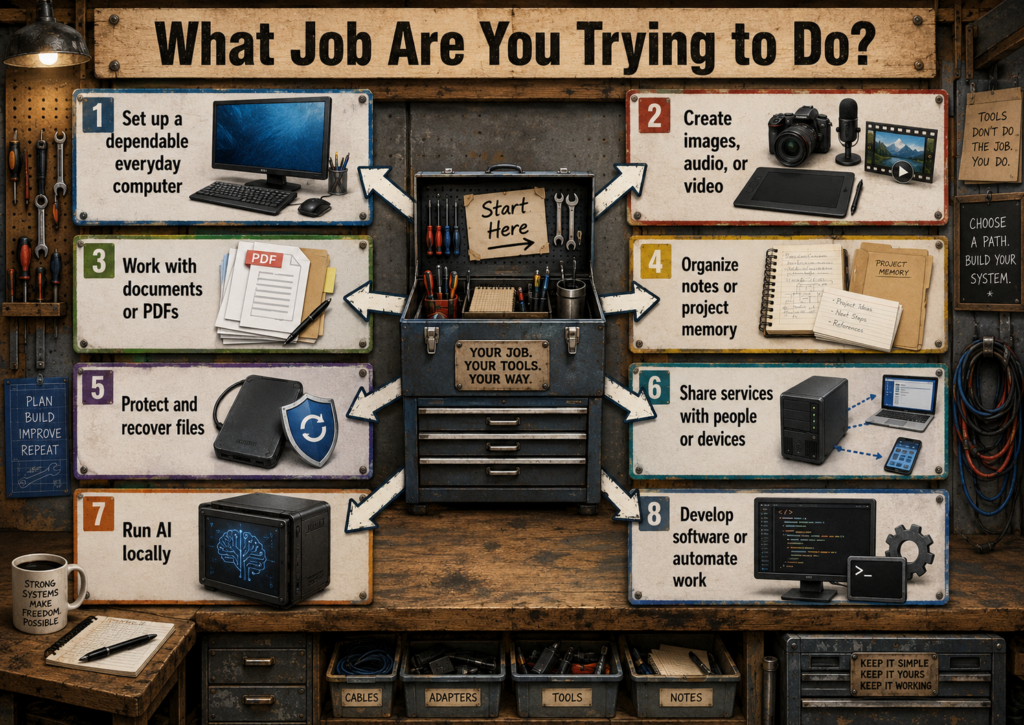
Start Here: What Do You Need the Software to Do?
Do not begin by choosing software. Begin by naming the job. A useful tool should solve a real problem, fit the hardware you already have, and leave you with a system you can understand and maintain.
The paths below are starting points. Follow the one closest to what you are trying to accomplish, then use the detailed sections farther down the page to compare the available tools.
Where Should the Software Run?
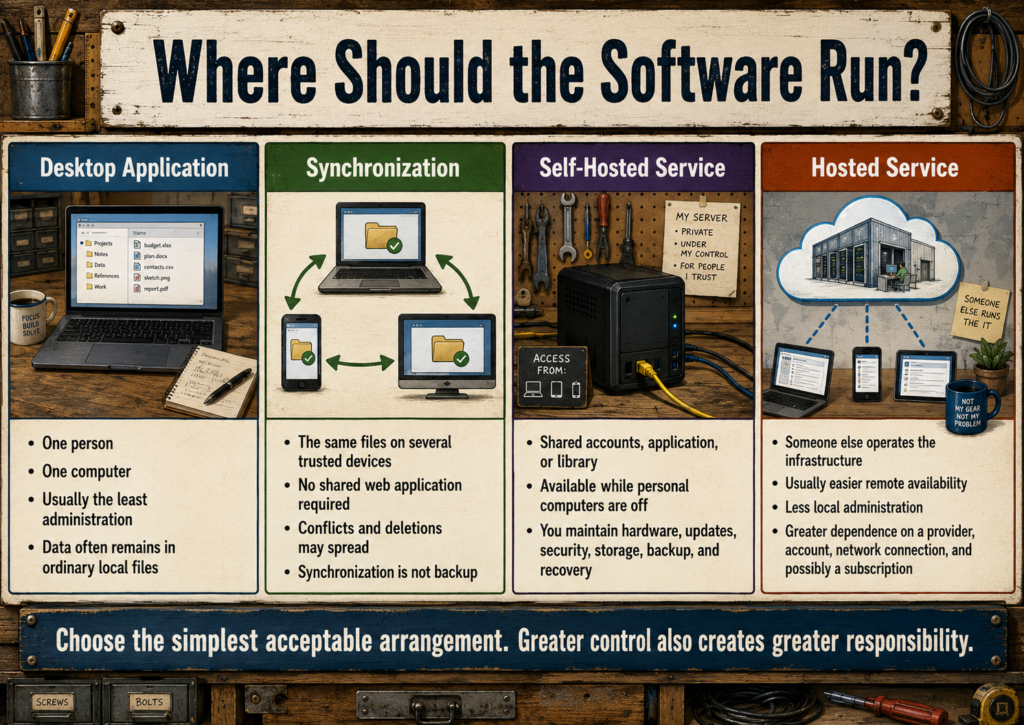
Before choosing a product, decide how many people and devices need it and who will maintain it. The least complicated arrangement that solves the job is usually the best starting point.
- Desktop application: use it when one person performs the work on one computer.
- Synchronization: use it when the same files must remain available on several trusted devices, but no shared web application is required.
- Self-hosted service: use it when several people or devices need a shared application, account system, library, or continuously available source of data.
- Hosted service: use it when remote availability and reduced administration matter more than complete local control.
Synchronization is not backup, and a server creates responsibility for accounts, updates, security, storage, networking, backups, and recovery.
I Need a Dependable Everyday Computer
Start with the basics: a web browser, office suite, PDF reader, password manager, media player, and a reliable backup method. You do not need a server, database, container system, or complicated automation platform to gain more control over your computer.
- Good first choices: Firefox, LibreOffice, VLC, KeePassXC, and a simple external-drive backup.
- Consider changing the operating system: when the current system no longer supports the hardware well, interferes with the way you work, or prevents you from controlling your own files and applications.
- Do not add complexity yet: if ordinary desktop applications already solve the problem.
I Create Images, Audio, or Video
Choose creative software according to the type of work, not according to which program has the longest feature list.
- Photo editing and compositing: start with GIMP.
- Digital painting and illustration: start with Krita.
- Logos, icons, diagrams, and scalable graphics: start with Inkscape.
- Photo organization and large image collections: start with digiKam.
- Basic audio recording and editing: start with Audacity or Tenacity.
- Video editing: start with Kdenlive if you expect to grow into larger projects; consider OpenShot for simpler editing.
I Need Documents, Spreadsheets, or PDFs
For most people, an office suite and a small set of PDF tools are enough. Start with normal desktop applications before building a document server or collaborative platform.
- General documents and spreadsheets: begin with LibreOffice.
- Microsoft Office compatibility is the main concern: also compare ONLYOFFICE Desktop Editors.
- Reading and marking PDFs: use a lightweight PDF reader with annotation support.
- Scanning and searchable archives: consider OCR and document-management tools only after deciding how the files will be named, stored, and backed up.
I Need Notes, Memory, or Project Organization
The best note system is one you can search, back up, and continue using years from now. Plain files and open formats are often more valuable than elaborate features.
- Simple notes that remain ordinary files: begin with Markdown and a normal folder structure.
- Linked personal knowledge and project notes: compare Obsidian and Logseq.
- Open-source notes with synchronization options: consider Joplin.
- Structured records, inventories, or repeatable forms: a spreadsheet may be enough; use a database only when the relationships and volume justify it.
I Need to Protect My Files
Begin with backup before synchronization, RAID, remote access, or a home server. A second copy that can be restored is more important than an impressive storage arrangement.
- One computer: start with scheduled backups to an external drive.
- Several computers: decide which files need synchronization and which need independent backup copies.
- Important or irreplaceable files: keep at least one additional copy away from the main computer.
- Before trusting any backup: test that files can actually be restored.
I Want a Home Server
A home server is useful when several people or devices need shared storage, media, applications, synchronization, or remote access. It is not automatically the best answer for a single user with one computer.
- Shared files and calendars: compare Nextcloud and simpler file-sharing options.
- Movies, television, and music: consider Jellyfin.
- Books and comics: consider Kavita or a similar library server.
- Several containerized services: learn Docker Compose or Podman Compose only after understanding where each service stores its data.
- Before exposing anything to the internet: establish updates, authentication, backups, and a recovery plan.
I Want to Use AI Locally
Local AI can provide privacy, offline access, and control, but model size and speed are limited by the computer’s memory, processor, and graphics hardware. Begin with the task and the available hardware rather than downloading the largest model you can find.
- Simple local chat: begin with a desktop-friendly runner or a small Ollama installation.
- Several users or a browser interface: consider Ollama with Open WebUI.
- Document search or project memory: first organize the source files and decide what information the system should be allowed to index.
- Older or limited hardware: use smaller models and realistic expectations instead of treating slow performance as a failed installation.
I Develop Software or Automate Repetitive Work
Start with tools that make the work understandable and repeatable. Automation should remove dependable repetition, not hide a process nobody understands.
- Writing and editing code: begin with a capable text editor or development environment.
- Tracking changes: learn Git before adding elaborate project-management systems.
- Repeatable installation and configuration: consider shell scripts or Ansible.
- Isolated services and reproducible environments: consider containers after learning where configuration, data, logs, and secrets are stored.
A Sensible Starting Software Kit
Someone setting up a personal computer does not need to install everything on this page. The following is a practical starting kit that covers common work without creating a maintenance project.
- Web: Firefox or another browser you understand and can keep updated.
- Documents: LibreOffice.
- Media: VLC.
- Passwords: KeePassXC for a local password vault, or Bitwarden when convenient synchronization is required.
- Images: an image viewer plus GIMP, Krita, or Inkscape only when that kind of work is actually needed.
- Notes: ordinary text or Markdown files in a clearly named folder.
- Backup: scheduled copies to a separate drive, with at least one restore test.
Add specialized tools one job at a time. A smaller system that is understood, maintained, and backed up is usually more useful than a large collection of applications installed “just in case.”
Operating Systems
The operating system is the base beneath everything else. Linux offers many distributions because different people need different balances of familiarity, stability, customization, and hardware support.
- Linux Mint: familiar desktop layout and a gentle starting point for many people new to Linux. Beginner.
- Ubuntu and Kubuntu: broad software support with GNOME or KDE Plasma desktop choices. Beginner to intermediate.
- Fedora: newer Linux technologies with a polished desktop and relatively frequent releases. Intermediate.
- Debian: a strong base for stable workstations and servers, with more decisions left to the installer. Intermediate.
- openSUSE: strong administration and snapshot tools, available in stable and rolling-release forms. Intermediate.
DPD currently uses Kubuntu on Atoll and Debian on Harbor. That reflects the roles of those machines, not a rule for everybody else.
Which Operating System Should You Choose?
Changing the operating system is a larger decision than installing an application. Before replacing anything, check that the programs, printers, scanners, graphics hardware, games, and accessibility tools you depend on will work acceptably on the new system.
When possible, test a Linux distribution from a live USB before installing it. This lets you check the desktop, networking, sound, displays, and basic hardware support without immediately changing the computer’s internal drive.
Start With Linux Mint When
- You want a familiar desktop arrangement while learning Linux.
- You want common desktop software and hardware support without making many installation decisions.
- You prefer a conservative, approachable system over having the newest Linux components immediately.
Look elsewhere when: you specifically want KDE Plasma, very new software stacks, or a minimal server installation.
Choose Ubuntu When
- You want broad documentation, commercial support, and software instructions that commonly target Ubuntu.
- You are comfortable with the GNOME desktop and its workflow.
- You want a widely used Linux base for a workstation, development machine, or general-purpose server.
Look elsewhere when: you dislike GNOME’s desktop layout or want fewer distribution-specific packaging choices.
Choose Kubuntu When
- You want Ubuntu’s broad software base with the KDE Plasma desktop.
- You value desktop customization, traditional menus, panels, and detailed system settings.
- You want a flexible workstation that can be adjusted gradually as your workflow develops.
Look elsewhere when: extensive customization options feel distracting or you want an especially simple, fixed desktop experience.
Choose Fedora When
- You want newer Linux technologies and relatively recent application versions.
- You are comfortable upgrading the operating system more frequently.
- You develop software or want to work close to current Linux standards.
Look elsewhere when: long periods between major upgrades matter more than receiving newer software quickly.
Choose Debian When
- You prioritize stability, predictability, and a long-lived base.
- You are building a server and want to install only the components the machine actually needs.
- You are comfortable making more installation and configuration decisions yourself.
Look elsewhere when: you need the newest desktop applications, drivers, or hardware support with the least manual effort.
Choose openSUSE When
- You value strong graphical administration tools.
- You want filesystem snapshot and rollback features integrated into the system.
- You want to choose between a steadier release model and a continuously updated rolling release.
Look elsewhere when: you want the largest beginner community or instructions written specifically for Ubuntu-based systems.
Before Installing a Different Operating System
- Back up important files to a separate device.
- Confirm that the backup can be opened and restored.
- Record software license information and account details you may need later.
- Check support for graphics hardware, Wi-Fi, printers, scanners, audio devices, and special peripherals.
- Test the new system from a live USB when that option is available.
- Keep recovery media for the original system until the replacement is proven dependable.
Creative Work
- GIMP: photo editing, image manipulation, restoration, and compositing. Beginner to intermediate.
- Krita: digital painting, illustration, texture work, and drawing-tablet workflows. Beginner to intermediate.
- Inkscape: vector graphics, logos, diagrams, signs, and scalable artwork. Beginner to intermediate.
- Scribus: page layout and print-oriented publishing. Intermediate.
- Blender: 3D modeling, rendering, animation, video compositing, and technical visualization. Intermediate to advanced.
- darktable or RawTherapee: nondestructive processing of camera RAW files. Intermediate.
- digiKam: large photo-library organization, tagging, metadata, and face-grouping tools. Intermediate.
- Kdenlive, Shotcut, or OpenShot: video editing at different levels of complexity. Beginner to advanced, depending on the editor and project.
- Audacity, Tenacity, or Ardour: audio editing and recording, from simple cleanup to multitrack production. Beginner to advanced, depending on the tool and project.
No single creative program replaces every commercial suite. A practical independent studio is often a small collection of specialized tools.
Choose Creative Software by the Kind of Work
Creative applications often overlap, but they are not interchangeable. The easiest way to choose is to identify the material you are working with—photographs, painted artwork, vectors, printed pages, video, audio, or three-dimensional scenes.
GIMP: Photos, Compositing, and Pixel-Based Images
Choose GIMP when the work begins with photographs, screenshots, scanned images, textures, or other pixel-based files. It is well suited to cropping, color correction, restoration, removing or combining image elements, creating transparent backgrounds, and building layered compositions.
- Start with GIMP for: photo repair, web graphics, image compositing, texture editing, and preparing images for publishing.
- Choose Krita instead: when the main activity is drawing or painting with brushes.
- Choose Inkscape instead: when artwork must scale cleanly to any size or be edited as paths and shapes.
Krita: Drawing, Painting, and Illustration
Choose Krita when the work begins with a blank canvas, a drawing tablet, or a sketch. Its brush system and painting workflow are designed for illustration, comics, concept art, textures, and hand-drawn animation.
- Start with Krita for: digital painting, character art, comics, concept sketches, and tablet-based drawing.
- Choose GIMP instead: when detailed photo manipulation and compositing are the central tasks.
- Choose Inkscape instead: when the artwork is made primarily from geometric shapes, paths, and reusable vector elements.
Inkscape: Logos, Icons, Signs, and Vector Artwork
Choose Inkscape when the artwork needs to remain sharp at many sizes. Vector graphics are particularly useful for logos, diagrams, signs, interface icons, cut paths, technical illustrations, and artwork that may appear on both a small screen and a large printed surface.
- Start with Inkscape for: logos, icons, diagrams, decals, signs, and scalable line art.
- Choose GIMP instead: when the source is a photograph or the work depends on pixel-level editing.
- Choose Scribus instead: when several pages of text and images must be arranged for publication.
Scribus: Page Layout and Print Publishing
Choose Scribus for projects in which text, images, margins, columns, page sizes, and print output must be managed together. It is a page-layout tool rather than a word processor or drawing application.
- Start with Scribus for: brochures, newsletters, booklets, print-ready PDFs, and multi-page visual layouts.
- Choose LibreOffice Writer instead: when the project is primarily a written document with ordinary formatting.
- Prepare artwork elsewhere: photographs may be edited in GIMP and vector artwork in Inkscape before being placed into Scribus.
darktable or RawTherapee: Camera RAW Processing
Choose one of these when working directly with RAW files from a digital camera. Both preserve the original image while storing processing instructions separately, allowing exposure, color, contrast, lens correction, and detail adjustments without permanently changing the source file.
- Consider darktable: when you want an integrated photo workflow with library and editing features.
- Consider RawTherapee: when detailed RAW development controls are the priority.
- Use GIMP afterward: when the developed image needs compositing, object removal, text, or detailed pixel editing.
digiKam: Managing a Large Image Collection
Choose digiKam when finding, grouping, tagging, rating, and maintaining photographs has become a larger problem than editing any one image. It is designed for the library surrounding the pictures rather than for replacing a full image editor.
- Start with digiKam for: tags, albums, metadata, ratings, duplicate review, and organizing large collections.
- Do not treat organization as backup: the image library and its database still need separate recoverable copies.
- Keep the original files understandable: use meaningful folders and filenames so the collection does not depend entirely on one application database.
Which Video Editor Should You Choose?
Kdenlive
Choose Kdenlive when you expect to work with several tracks, effects, transitions, titles, proxies, and longer projects. It offers room to grow without immediately requiring a professional production environment.
Shotcut
Choose Shotcut when you want a capable cross-platform editor with broad format support and a comparatively direct interface. It can be a useful middle ground between simple editing and a larger multitrack workflow.
OpenShot
Choose OpenShot for straightforward cuts, titles, transitions, and smaller projects when ease of entry matters more than advanced control.
Practical starting point: use OpenShot for simple jobs, Shotcut when you want a balanced general editor, and Kdenlive when you expect the projects and workflow to become more involved.
Which Audio Tool Should You Choose?
Audacity or Tenacity
Choose Audacity or Tenacity for recording narration, trimming clips, removing noise, adjusting levels, converting formats, and working with a small number of tracks. These are sensible starting points for podcasts, voice recordings, sound effects, and ordinary cleanup work.
Ardour
Choose Ardour when the project behaves more like a recording studio: many tracks, repeated takes, routing, mixing, plugins, automation, and careful control over the final production.
Practical starting point: begin with Audacity or Tenacity unless you already know that you need a full multitrack digital audio workstation.
Blender Is Its Own Workshop
Blender can model, sculpt, animate, render, composite, edit video, and create technical visualizations. That range is powerful, but it also means Blender has a substantial learning curve. Install it because a project needs three-dimensional work or one of its specialized capabilities—not simply because it appears to replace several smaller programs.
A practical creative setup may use several applications together: digiKam to organize source images, darktable to process RAW photographs, GIMP for compositing, Inkscape for logos and diagrams, Scribus for page layout, and Kdenlive for the final video. Specialized tools are often easier to understand and replace than one enormous workflow built around a single application.
Office, Documents, and PDF Tools
- LibreOffice: local documents, spreadsheets, presentations, drawings, and databases. Beginner.
- ONLYOFFICE Desktop Editors: another desktop office option with a strong focus on common Microsoft formats. Beginner.
- Collabora Online or ONLYOFFICE Docs: browser-based collaborative editing when connected to a self-hosted platform. Advanced.
- Okular and Evince: straightforward document and PDF reading. Beginner.
- PDF Arranger: reorder, combine, split, and rotate PDF pages through a simple interface. Beginner.
- LibreOffice Draw: useful for modest PDF corrections and layout work. Beginner to intermediate.
- Stirling-PDF: a broad browser-based PDF toolkit that can be run locally or on a private server. Intermediate.
- Xournal++: handwritten notes and PDF annotation. Beginner to intermediate.
Choose Office Software by Compatibility and Workflow
Most people need a desktop office suite, not a document server. Begin with local applications unless several people must edit the same files through a browser or a self-hosted collaboration system.
LibreOffice: The General-Purpose Starting Point
Choose LibreOffice when you want a complete local office suite for writing, spreadsheets, presentations, diagrams, and ordinary database work. It uses open document formats by default and can also read and write many Microsoft Office files.
- Start with LibreOffice for: personal documents, household records, schoolwork, reports, budgets, presentations, and offline work.
- Test compatibility first: when documents contain complicated Microsoft Office formatting, macros, specialized fonts, or advanced spreadsheet features.
- Use its native formats when practical: especially for documents that will remain under your control rather than circulating through Microsoft Office workflows.
ONLYOFFICE Desktop Editors: Prioritize Microsoft Format Compatibility
Choose ONLYOFFICE Desktop Editors when working with DOCX, XLSX, and PPTX files is the main concern and you prefer an interface closer to modern Microsoft Office.
- Start with ONLYOFFICE Desktop Editors when: files are regularly exchanged with Microsoft Office users and layout compatibility matters more than support for open formats.
- Choose LibreOffice instead: when you want a broader traditional office suite, stronger open-format support, or additional tools such as Draw and Base.
- Keep important originals: conversion between office formats can occasionally alter spacing, formulas, fonts, or page layout.
Desktop Office Suite or Collaborative Document Server?
A collaborative document server is appropriate when several people need to edit documents through a browser, especially when it is connected to a platform such as Nextcloud. It is not simply a more powerful replacement for a normal office application.
- Use desktop software: for one person, one computer, offline work, and ordinary file sharing.
- Consider Collabora Online: when open document formats and LibreOffice-style compatibility fit the existing workflow.
- Consider ONLYOFFICE Docs: when browser-based editing of common Microsoft formats is the priority.
- Expect server responsibilities: updates, authentication, storage, performance, security, backups, and recovery.
For many households and small projects, sending or synchronizing an ordinary document is simpler than maintaining a collaborative office server.
Choose a PDF Tool by the Change You Need
Reading and Reviewing
Choose Okular or Evince when the job is primarily opening, reading, searching, printing, and reviewing PDF documents. Okular provides a broader collection of annotation and document features, while Evince favors a simpler reading experience.
Reordering, Combining, or Splitting Pages
Choose PDF Arranger when you need to drag pages into a different order, remove pages, rotate them, combine several documents, or split one document into smaller files. It is often the simplest answer for structural changes that do not require editing the page contents.
Small Corrections and Layout Adjustments
LibreOffice Draw can open many PDFs and is useful for modest corrections, replacing small pieces of text, moving page elements, and making simple layout changes. Complex PDFs may not import perfectly, so preserve the original file before editing.
Handwriting and Annotation
Choose Xournal++ when the work involves handwritten notes, a stylus, highlighting, classroom material, forms, or writing directly over an existing PDF.
A Larger Local PDF Toolkit
Choose Stirling-PDF when you repeatedly need a wider range of browser-based PDF operations from one interface. It can be run locally for one user or hosted privately for several users, but the server version adds maintenance and security responsibilities.
- Use a small desktop tool: when one application already performs the required task.
- Use Stirling-PDF locally: when one computer needs a broad collection of PDF operations.
- Self-host it: only when several people or devices genuinely benefit from shared browser access.
Scanned Documents, OCR, and Searchable Archives
A scanned page is often only a picture until optical character recognition, or OCR, identifies the text. OCR can make scans searchable and easier to organize, but recognition errors are common with handwriting, damaged pages, unusual fonts, and low-quality images.
- For occasional scans: use a scanning application and save clear, consistently named files.
- For searchable documents: add OCR, then verify important names, dates, amounts, and identifiers against the original page.
- For a large archive: decide on folders, filenames, metadata, retention, and backups before importing thousands of files into a document-management system.
- Keep the source scan: an OCR-generated text layer should not be treated as a flawless replacement for the original image.
Before Sharing an Office Document or PDF
- Open the exported file and check that fonts, page breaks, images, formulas, and margins still appear correctly.
- Remove comments, tracked changes, hidden sheets, and private notes that should not leave the computer.
- Check document properties and metadata for names, software details, revision history, or other information you did not intend to share.
- Keep an editable source copy when distributing a final PDF.
- Use password protection or encryption only when the recipient understands how the file will be opened and how the password will be delivered safely.
Memory, Notes, and Personal Knowledge
This category ranges from a folder of text files to a linked personal knowledge system. The important distinction is whether the notes remain usable outside the original application.
- Plain text and Markdown: the simplest durable option. Files can be searched, copied, versioned, and opened by many programs. Beginner.
- Obsidian: a polished linked-note system built around local Markdown files and optional plugins. Beginner to intermediate.
- Joplin: notebooks, Markdown, attachments, encryption, and several synchronization choices. Beginner to intermediate.
- Logseq: outlining, linked notes, journals, and graph-style knowledge organization. Intermediate.
- Zettlr: Markdown writing and research-oriented note management. Beginner to intermediate.
- CherryTree: hierarchical notebooks for people who prefer a traditional tree structure. Beginner.
- Nextcloud Notes: straightforward notes tied to a private Nextcloud account. Intermediate to advanced when maintaining the server; beginner for an existing account.
Project Memory and Working Standards
Some projects need more than notes. They need durable decisions, standards, plans, and instructions that people or software agents can reuse.
- Agent OS by Builder Methods: a structured project layer for standards, plans, reusable instructions, and consistent agent-assisted work.
- Project README and documentation folders: the simplest portable approach for recording setup, purpose, and recovery steps.
- Architecture decision records: short documents explaining what was chosen, what alternatives were considered, and why.
- Wikis: useful when many related pages, people, or procedures must be connected.
- Issue trackers: turn loose plans into assignable work, history, and visible progress.
Choose the Simplest Note System That Will Last
A note system should make information easier to capture, find, reuse, and preserve. More features do not automatically create better memory. A small collection of clearly named files may be more dependable than an elaborate system nobody remembers how to maintain.
Plain Text and Markdown: The Durable Starting Point
Choose plain text or Markdown when portability, transparency, and long-term access matter most. These files can be opened by many applications, searched with ordinary tools, copied between systems, stored in Git, and recovered without rebuilding a proprietary database.
- Start here for: project notes, instructions, checklists, journals, research, configuration records, and documentation.
- Add a note application later: when links, tags, attachments, synchronization, or visual navigation solve a real problem.
- Keep filenames meaningful: a folder should remain understandable even when the preferred note application is unavailable.
Obsidian: Local Files With a Polished Knowledge Interface
Choose Obsidian when you want linked notes, backlinks, search, tags, visual connections, templates, and plugins while keeping the main note content in local Markdown files.
- Good for: personal knowledge bases, project notebooks, research collections, and interconnected reference material.
- Watch the plugin count: too many extensions can make the system harder to understand, move, or repair.
- Check portability: ordinary note text is portable, but application-specific links, metadata, layouts, and plugins may not behave the same elsewhere.
Joplin: Notebooks, Attachments, and Synchronization
Choose Joplin when you want a traditional notebook structure, Markdown editing, attachments, encryption, and several ways to synchronize notes between devices.
- Good for: users who want an open-source notebook application with desktop and mobile access.
- Choose it over loose files: when integrated synchronization and attachment handling are worth depending on an application database.
- Test exports: periodically confirm that important notes can be exported into a usable independent format.
Logseq: Journals, Outlines, and Connected Ideas
Choose Logseq when you naturally think in outlines, daily journals, nested blocks, linked references, and evolving connections between ideas.
- Good for: research trails, daily work logs, meeting notes, and knowledge assembled gradually from small linked entries.
- Look elsewhere when: you prefer conventional documents, folders, and longer pages over block-based writing.
- Keep the structure deliberate: a graph of thousands of loosely named notes can become harder to navigate than an ordinary folder tree.
Zettlr: Long-Form Markdown and Research Writing
Choose Zettlr when the main work is writing, research, citations, academic material, or managing a larger collection of Markdown documents as a coherent body of work.
CherryTree: A Familiar Hierarchical Notebook
Choose CherryTree when you prefer information arranged as notebooks, sections, and nested branches. It is useful for manuals, collected references, procedures, and users who find graph-style systems unnecessarily abstract.
Nextcloud Notes: Simple Notes Inside an Existing Nextcloud System
Choose Nextcloud Notes when a private Nextcloud server already exists and straightforward synchronized notes are more important than advanced knowledge-management features.
Do not build a Nextcloud server only to obtain a notes application. A server makes sense when the broader file, calendar, contact, sharing, and multi-user features are also useful.
Folders, Tags, Links, or a Database?
- Use folders: when each item has one obvious home and the collection is still understandable as a tree.
- Use tags: when the same note belongs to several topics or workflows.
- Use links and backlinks: when relationships between ideas are more useful than strict categories.
- Use a spreadsheet: when the information consists of repeated rows, columns, dates, amounts, statuses, or inventories.
- Use a database: when several kinds of records have meaningful relationships, validation rules, forms, queries, or concurrent users.
The tools may overlap. A project can use folders for documents, Markdown for decisions, an issue tracker for work, and a database for structured records without forcing every kind of information into one application.
Project Notes Are Not Yet Project Memory
Loose notes describe what someone was thinking. Project memory preserves what the project is, how it works, what decisions were made, what remains unfinished, and how another person—or the same person months later—can continue safely.
- README: explain the purpose, current state, basic structure, and how to begin.
- Setup instructions: record prerequisites, installation steps, configuration locations, and verification commands.
- Decision records: preserve important choices and the reasons behind them.
- Working standards: record naming, folder layout, testing, publishing, backup, security, and handoff expectations.
- Current-status file: state what works, what is being changed, what is blocked, and the next safe action.
- Recovery instructions: document where the data lives, how it is backed up, and how to restore service after failure.
When to Use a Wiki or Issue Tracker
Use a Wiki When
- Many procedures, topics, systems, or people need connected documentation.
- The information benefits from navigation, cross-linking, revision history, and shared editing.
- Someone is willing to maintain structure, remove obsolete pages, and keep instructions current.
Use an Issue Tracker When
- Work needs an owner, status, priority, history, and visible completion criteria.
- Bugs, requests, tasks, and decisions are becoming lost in general notes or conversations.
- The project needs to separate permanent documentation from temporary work still in progress.
A wiki explains the system. An issue tracker explains what must happen next. Neither replaces the other, and neither replaces a dependable backup.
Before Committing to a Note Application
- Create a small test notebook before importing years of material.
- Find where notes, attachments, settings, and databases are stored.
- Export several notes and verify that the result remains readable without the original application.
- Test search, links, tags, attachments, mobile access, and synchronization using disposable data.
- Back up both the note content and any database or configuration needed to reconstruct the system.
- Document the chosen folder structure and naming rules before the collection becomes large.
Databases and Structured Data
A database becomes useful when information must be searched, related, updated, or shared more reliably than a pile of documents or spreadsheets allows.
- SQLite: a compact database stored in a single file, excellent for desktop applications, indexes, prototypes, and small local tools. Beginner to intermediate.
- PostgreSQL: a powerful server database for applications, multi-user systems, structured project memory, and demanding data work. Intermediate to advanced.
- MariaDB or MySQL: common server databases used by WordPress, Nextcloud, and many web applications. Intermediate to advanced.
- DuckDB: local analytical database work, especially for querying data files and larger datasets. Intermediate.
- pgAdmin: graphical administration for PostgreSQL. Intermediate.
- DBeaver: one graphical client that can work with many different database systems. Intermediate.
- DB Browser for SQLite: a direct visual tool for opening and editing SQLite databases. Beginner to intermediate.
A spreadsheet is often the right starting point. Move to a database when the spreadsheet has become fragile, repetitive, difficult to validate, or hard for several tools to share.
Do You Actually Need a Database?
A database is useful when information has a repeatable structure and must remain consistent as it grows. It is not automatically better than a text file or spreadsheet. The simplest format that keeps the information accurate, searchable, and recoverable is usually the best choice.
Use a Plain List or Document When
- The information is short, mostly descriptive, and read more often than it is updated.
- Each item can be understood without sorting, filtering, calculating, or linking it to other records.
- A clearly named Markdown, text, or office document remains easier to maintain than a structured system.
Use a Spreadsheet When
- The information naturally fits into rows and columns.
- You need sorting, filtering, formulas, totals, charts, dates, statuses, or simple validation.
- One person or a small group can safely coordinate changes without overwriting one another.
- The file remains understandable when opened directly in an ordinary office suite.
A spreadsheet is not a failed database. It is often the most transparent and maintainable tool for household records, inventories, project lists, budgets, and moderate collections of structured information.
Move Beyond a Spreadsheet When
- The same information is copied into several sheets and becomes inconsistent.
- Several kinds of records must be connected, such as people, equipment, locations, transactions, or projects.
- Users frequently enter invalid values, duplicate records, or break formulas.
- Several applications or people need reliable access to the same data.
- The file has become slow, fragile, difficult to audit, or unsafe for simultaneous editing.
Choose the Database by the Job
SQLite: One File, One Application, or a Small Local Tool
Choose SQLite when the database belongs to one application, script, index, or local project. The entire database usually lives in one file, making it easy to copy, inspect, and include in a normal backup.
- Good for: desktop applications, prototypes, personal indexes, catalogs, local utilities, and modest single-user systems.
- Choose it over a server database: when network access, many simultaneous writers, and centralized administration are unnecessary.
- Use DB Browser for SQLite: when you need to inspect tables, edit records, test queries, or export data visually.
Although SQLite is simple to deploy, the database file can still be damaged by unsafe copying, interrupted storage, or poorly designed software. Back it up while the application is stopped or through a backup method that understands SQLite consistency.
PostgreSQL: Complex Applications and Dependable Shared Data
Choose PostgreSQL when an application needs a powerful shared database, strong data validation, complex queries, transactions, concurrent users, extensions, or room to grow.
- Good for: web applications, multi-user systems, structured project data, geographic information, analytics, and custom software.
- Choose it intentionally: when the application supports it well and the additional administration is justified.
- Use pgAdmin: when graphical PostgreSQL administration is useful, but keep command-line backup and recovery procedures documented as well.
MariaDB or MySQL: Common Web Application Databases
Choose MariaDB or MySQL when the software you are installing expects one of them. WordPress, Nextcloud, and many established web applications provide mature support for this database family.
- Good for: applications with documented MariaDB or MySQL installation and recovery procedures.
- Do not substitute databases casually: use the database versions and engines officially supported by the application.
- Back up both parts: application files and database contents are usually both required for a complete recovery.
DuckDB: Analyzing Data Without Building a Server
Choose DuckDB when the job is exploring, filtering, joining, and analyzing local datasets rather than running a traditional multi-user application server. It is especially useful for querying files such as CSV and Parquet directly.
- Good for: reports, data exploration, large local files, repeatable analysis, and work that has outgrown spreadsheet formulas.
- Choose PostgreSQL instead: when several applications or users need a continuously running shared database service.
Choose a Database Interface
- DB Browser for SQLite: focused and approachable for SQLite files.
- pgAdmin: specialized PostgreSQL administration and inspection.
- DBeaver: useful when one workstation must connect to several different database systems.
- Command-line clients: important for repeatable scripts, remote administration, troubleshooting, backups, and recovery.
A graphical interface can make a database easier to explore, but it does not replace understanding the database name, users, permissions, connection settings, storage location, backup method, and restore procedure.
A Database Is More Than the Data Directory
Copying a running database’s storage folder is not always a safe backup. Server databases maintain active files, transaction logs, permissions, and internal state that must remain consistent.
- Logical backup: export the database through its supported dump or backup command.
- Physical backup: use a documented method that preserves the database’s required files and consistency.
- Application backup: preserve uploaded files, configuration, encryption keys, secrets, and other data stored outside the database.
- Restore test: confirm that a new database instance can be rebuilt and the application can reconnect successfully.
Before Building a Database System
- Write down the kinds of records the system will contain.
- Identify which fields are required, optional, unique, or restricted to specific values.
- Define how records relate to one another before importing a large collection.
- Decide who may read, add, change, and delete information.
- Document the database name, service, users, ports, storage, and backup locations.
- Create a small disposable test dataset and prove the export and restore process.
Automation and Workflow
Automation can mean a scheduled backup, a visual workflow connecting several services, or a custom program that performs a repeatable job.
- Desktop shortcuts and application actions: the easiest way to remove repeated clicking without building infrastructure. Beginner.
- Shell and Python scripts: direct, portable automation for files, reports, maintenance, and custom tools. Intermediate.
- cron and systemd timers: dependable scheduled jobs on Linux systems. Intermediate.
- n8n: visual workflows that connect applications, APIs, databases, notifications, and AI services; cloud and self-hosted arrangements are available. Intermediate to advanced.
- Node-RED: browser-based flow programming especially useful for devices, sensors, events, and network services. Intermediate.
- Home Assistant automations: event-driven household and device workflows. Intermediate to advanced.
- GitHub Actions, GitLab CI, or local CI tools: automated testing, builds, releases, and project checks. Intermediate to advanced.
Start with the smallest reliable automation. A ten-line script that can be understood and repaired may be better than a huge workflow nobody remembers how to maintain.
Automate the Repetition, Not the Understanding
Automation is most useful after a process already works by hand. If the steps are unclear, unreliable, or constantly changing, automating them may only make the failure faster and harder to diagnose.
- First: perform the task manually and record the successful steps.
- Next: identify which steps are repetitive, predictable, and safe to run without constant supervision.
- Then: automate the smallest useful portion and confirm that failures are visible.
- Finally: document how to run, stop, inspect, repair, and remove the automation.
Choose the Smallest Automation Tool That Fits
Desktop Shortcuts and Application Actions
Start here when the problem is repeated clicking, opening the same files, launching several applications, exporting in a particular format, or applying the same action inside one program.
- Good for: launchers, templates, saved searches, presets, keyboard shortcuts, macros, and application-specific actions.
- Choose this before scripting: when the application already provides a dependable built-in feature.
- Look elsewhere when: several programs, files, machines, or network services must work together.
Shell Scripts: Direct Linux Automation
Choose a shell script when the job consists mainly of commands, files, folders, backups, system checks, package operations, or launching other programs in a repeatable order.
- Good for: file organization, backups, maintenance, reports, software setup, and repeatable administration.
- Keep it readable: use clear names, comments, error checks, and visible output.
- Avoid destructive assumptions: verify paths, devices, filenames, and permissions before changing or deleting data.
Python: Logic, Data, and Larger Custom Tools
Choose Python when the automation needs more involved logic, structured data, file parsing, reports, user interfaces, database access, testing, or reusable components.
- Good for: data processing, custom utilities, APIs, reports, image and document workflows, and tools that may grow over time.
- Choose shell instead: when a short sequence of ordinary system commands already solves the problem clearly.
- Record dependencies: document the Python version, packages, virtual environment, and command needed to run the tool.
cron or systemd Timers: Scheduled Linux Jobs
Choose a scheduler when a working command or script must run at a certain time or interval without someone remembering to start it.
- cron: simple and widely understood for ordinary recurring commands.
- systemd timers: useful when jobs need service dependencies, structured logs, missed-run handling, or closer integration with the operating system.
- Before scheduling: run the exact command in the intended user account and environment.
- Make failures visible: keep logs and provide a way to notice when the job stops succeeding.
n8n: Connecting Services and Information
Choose n8n when a workflow must move information between applications, APIs, databases, notifications, forms, cloud services, or local AI tools. Its visual editor can make multi-step integrations easier to see than a large custom script.
- Good for: receiving events, transforming information, sending notifications, updating records, and coordinating several services.
- Use a script instead: when the work is local, compact, and does not benefit from a continuously running workflow service.
- Expect server responsibilities when self-hosted: authentication, secrets, updates, execution history, database backups, and recovery.
Node-RED: Events, Devices, and Visual Flows
Choose Node-RED when events from devices, sensors, message systems, network services, or small computers must trigger visible flows and actions.
- Good for: hardware projects, sensors, dashboards, MQTT, home systems, and event-driven integrations.
- Choose n8n instead: when the workflow is primarily business information, web services, forms, databases, and application APIs.
- Keep flows documented: visual wiring can become just as confusing as code when names, groups, and responsibilities are unclear.
Home Assistant Automations: Household Events and Devices
Choose Home Assistant automations when the triggers and actions belong to the household: lights, temperatures, doors, schedules, presence, energy use, media, alerts, and compatible devices.
Do not install Home Assistant merely as a general-purpose automation platform. It is most valuable when its device integrations, local control, dashboards, and household event model are central to the job.
Continuous Integration: Testing and Releasing Projects
Choose GitHub Actions, GitLab CI, or a local continuous-integration system when a software or documentation project needs repeatable checks after changes are committed.
- Good for: tests, formatting checks, builds, packaging, documentation generation, release files, and deployment checks.
- Run checks locally first: developers should not need a remote service to discover every ordinary error.
- Protect secrets: credentials and signing keys must not be stored directly in the project repository or printed into job logs.
Local Automation or a Running Service?
- Use a local command or script: when one machine performs a job on demand or on a simple schedule.
- Use a desktop application: when a person should review or guide each run.
- Use a continuously running service: when it must receive events, serve several users, coordinate network systems, or remain available at all times.
- Use a server only when necessary: continuous availability also means continuous responsibility.
Every Automation Needs an Escape Hatch
- A clear command or switch to disable it.
- Logs that show what ran, what changed, and why it failed.
- Limits that prevent one mistake from processing or deleting an entire collection.
- A dry-run or preview mode when files, accounts, devices, or published material may be changed.
- A manual method for completing the task when the automation is unavailable.
- Backup and rollback steps for anything the automation can alter.
Before Automating a Workflow
- Write the successful manual steps in plain language.
- Identify the inputs, outputs, accounts, files, services, and permissions involved.
- Decide what should happen when information is missing, duplicated, malformed, or unavailable.
- Test with disposable data and a limited number of items.
- Confirm that repeated runs do not create duplicate records or repeat destructive actions.
- Document ownership, dependencies, schedules, logs, secrets, backup, and removal.
Local and Private AI
AI software is a stack rather than one program. The model runner, interface, models, memory, image workflow, speech system, and outside services may all be separate choices.
- Ollama: a straightforward way to download and run supported language models locally, with command-line and API access. Intermediate.
- llama.cpp: a flexible, efficient foundation for running compatible models across many kinds of hardware. Intermediate to advanced.
- Open WebUI: a self-hostable browser interface that can connect to local and compatible remote model providers. Intermediate to advanced.
- LM Studio: a desktop-oriented graphical option for downloading, testing, and serving compatible models. Beginner to intermediate.
- ComfyUI: node-based image-generation and processing workflows with extensive control and reusable graphs. Intermediate to advanced.
- Stable Diffusion WebUI variants: more traditional browser interfaces for local image generation. Intermediate to advanced.
- Whisper and faster-whisper: local speech-to-text building blocks. Intermediate.
- Piper, Kokoro, and other local speech engines: text-to-speech options with different voice, speed, and hardware requirements. Intermediate.
- AnythingLLM, local retrieval tools, and vector databases: connect models to selected documents and knowledge collections. Intermediate to advanced.
“Local AI” does not automatically mean every feature stays local. Check where the selected model, interface, plugins, search tools, and APIs send information. Hardware requirements also vary enormously by model size and task.
Choose Local AI by the Job, Not the Model Name
Begin by deciding what the system must do: hold a private conversation, summarize text, search selected documents, generate images, transcribe speech, read text aloud, assist with code, or provide a shared interface for several users. Each task may require a different model, runner, interface, and amount of hardware.
A larger model is not automatically the better choice. A smaller model that responds quickly, fits reliably in memory, and performs the required task may be far more useful than a stronger model that makes the computer slow or unstable.
Desktop Application or Local AI Service?
Choose a Desktop Application When
- One person will use AI from one computer.
- You want a graphical way to download, test, and remove models.
- You do not need several applications or devices to share the same model service.
- You want to learn what the hardware can run before building a larger stack.
Practical starting point: LM Studio can provide a desktop-oriented introduction to compatible local language models without requiring a separate browser interface or server stack.
Choose Ollama When
- You want a straightforward local model service with command-line and API access.
- Several local applications may need to use the same installed models.
- You want the model runner separated from the interface.
- You are comfortable managing models and services outside a single desktop application.
Ollama can be useful by itself for command-line work and application integration. A browser interface is optional rather than a required part of the basic installation.
Choose llama.cpp When
Choose llama.cpp when efficiency, portability, hardware experimentation, detailed control, or embedding a compatible model runner into another project matters more than having a polished all-in-one application.
- Good for: experienced users, custom integrations, unusual hardware, command-line workflows, and testing model performance directly.
- Choose Ollama or LM Studio instead: when convenient model management and a gentler starting point matter more than low-level control.
Add Open WebUI When
- You want to use local models through a browser.
- Several people or devices need access to the same model service.
- You want conversation history, accounts, model selection, document features, or a more complete chat interface.
- You are prepared to maintain another application, its data, authentication, updates, and backups.
Open WebUI does not make the underlying model more capable. It provides a richer way to access model runners and compatible services. Install it because the interface and multi-user features are useful, not because it is assumed to be part of every local AI setup.
Match the Model to the Hardware
Language models use system memory, graphics memory, processor time, storage space, and electrical power. Image generation can place even heavier demands on a graphics card. The useful limit is not merely whether a model starts—it is whether the whole computer remains responsive and the output arrives quickly enough to be worth using.
- Limited hardware: begin with small quantized models and short context sizes.
- More system RAM than graphics memory: some model work may be divided between the processor and graphics card, usually with reduced speed.
- Older graphics card: check software and driver compatibility before assuming that available graphics memory can be used effectively.
- No suitable graphics card: smaller language models may still run on the processor, but image generation and large models may be impractically slow.
- Shared machine: leave enough memory and processing capacity for the operating system and ordinary applications.
Model labels do not describe the complete memory requirement. Quantization, context length, cache size, concurrent users, image resolution, and supporting software can all change what the system needs.
Local Chat, Document Search, and Project Memory Are Different Jobs
Local Chat
Local chat sends the current prompt and available conversation context to a model running on the local machine. This is the simplest arrangement and does not require a document index or vector database.
Document Search and Retrieval
Retrieval systems search selected documents for relevant passages and provide those passages to the model. This may involve document parsing, chunking, embeddings, indexes, a vector database, and rules about which sources may be searched.
- Good for: manuals, policies, research collections, project documents, and private reference libraries.
- Not automatic truth: the model can still misunderstand retrieved text, overlook a better passage, or make unsupported claims.
- Keep citations visible: users should be able to inspect the source material behind important answers.
- Control the collection: do not index private, obsolete, duplicated, or poorly organized material without understanding the consequences.
Project Memory
Project memory is the deliberate preservation of standards, decisions, plans, current status, and recovery information. AI can help search and apply that material, but the memory should remain understandable and usable without the AI system.
A folder of maintained Markdown documents, decision records, checklists, and status files may provide more dependable project memory than automatically indexing every conversation and hoping the model identifies what matters.
Choose Image Generation Software by Workflow
ComfyUI
Choose ComfyUI when you want reusable node-based workflows, precise control over model components, repeatable processing chains, image-to-image work, upscaling, masks, and experiments that can be saved as graphs.
- Good for: advanced and repeatable workflows where seeing each processing stage is valuable.
- Look elsewhere when: you want a simple prompt box and do not need to understand or control the pipeline.
Stable Diffusion WebUI Variants
Choose a traditional web interface when you want prompt-based image generation with familiar panels, extensions, model selection, image-to-image tools, and settings exposed through forms rather than a node graph.
Local image systems can consume substantial storage because checkpoints, refiners, control models, adapters, upscalers, and generated images accumulate quickly. Decide where models and output files will live before installing a large collection.
Speech-to-Text or Text-to-Speech?
Whisper and faster-whisper: Speech-to-Text
Choose these tools when recorded or live speech must be converted into written text. Common uses include transcription, subtitles, searchable recordings, voice notes, and accessibility workflows.
- Check accuracy manually: names, technical terms, numbers, punctuation, and unclear audio are frequent sources of error.
- Preserve the recording: the transcript is an interpretation, not a replacement for the source audio.
Piper, Kokoro, and Other Speech Engines: Text-to-Speech
Choose a text-to-speech engine when written text must be read aloud for accessibility, narration, notifications, application voices, or hands-free workflows.
- Compare more than voice quality: consider speed, language support, licensing, hardware needs, pronunciation control, and integration options.
- Test the real material: a pleasant demonstration voice may still perform poorly with names, numbers, technical language, or long passages.
Check What “Local” Actually Means
- Model execution: confirm whether the model itself runs on the local machine.
- Interface connections: inspect whether the interface is configured to use remote providers.
- Web search and plugins: outside tools may transmit prompts, search terms, documents, or generated content.
- Accounts and telemetry: determine whether sign-in, usage reporting, crash reporting, or hosted synchronization is enabled.
- Document processing: check whether file parsing, embeddings, OCR, transcription, or storage happens locally.
- Updates and model downloads: an offline-capable system may still require internet access to install software and obtain models initially.
Privacy depends on the complete path taken by the information, not merely on the word “local” appearing in the product description.
Before Installing a Local AI Stack
- Name the specific task and decide what a successful result looks like.
- Record the computer’s processor, system memory, graphics hardware, graphics memory, available storage, and operating system.
- Begin with one runner, one interface, and one small model.
- Test speed, accuracy, memory use, stability, and power consumption before adding more models.
- Find where models, conversations, indexes, uploads, generated images, settings, and logs are stored.
- Decide which data should never be sent to remote providers or indexed by the system.
- Back up project instructions, prompts, workflows, indexes that are expensive to rebuild, and any original material that the system processes.
- Document how to stop, update, remove, and rebuild every component.
Development and Project Tools
- Git: local version history for code, documents, configurations, and other text-based projects. Beginner to intermediate.
- GitHub, GitLab, Codeberg, Gitea, or Forgejo: different hosted and self-hosted homes for Git repositories, issues, and collaboration. Beginner to advanced, depending on the service and whether it is self-hosted.
- Visual Studio Code and VSCodium: extensible editors with broad language and tool support. Beginner to intermediate.
- Kate: a capable KDE text editor with project and development features. Beginner to intermediate.
- Geany: a lighter editor and small development environment. Beginner.
- Python: useful for automation, desktop utilities, data work, AI, and rapid prototypes. Beginner to intermediate.
- Podman or Docker: package services and their dependencies into manageable containers. Intermediate to advanced.
- Docker Compose: describe several connected containers as one reproducible stack. Intermediate to advanced.
- Virtual machines: isolate whole operating systems for testing, legacy software, or risky experiments. Intermediate.
Start With the Project, Not the Toolchain
A development setup should make the project easier to understand, change, test, and recover. A small script may need only a text editor, Git, and a clear README. Containers, hosted services, continuous integration, issue trackers, and virtual machines should be added only when they solve a specific problem.
Text Editor or Development Environment?
Choose a Simple Text Editor When
- You are editing configuration, Markdown, shell scripts, HTML, CSS, or a small amount of code.
- You want a fast application with few dependencies and a clear view of the files.
- The project does not need extensive debugging, language servers, refactoring, or integrated build tools.
Kate is a strong general choice on KDE systems, while Geany provides a lightweight editor with basic project and development features.
Choose Visual Studio Code or VSCodium When
- The project benefits from language support, debugging, source control integration, terminals, remote tools, or extensions.
- You work across several programming languages or project types.
- You are willing to manage extensions and project-specific settings.
Choose Visual Studio Code when its official distribution and marketplace fit the workflow. Choose VSCodium when you prefer a community-built distribution without Microsoft’s branding and default telemetry, while understanding that some proprietary extensions may be unavailable or require additional setup.
More extensions do not automatically create a better environment. Install only those needed by the project, and record important extension names or workspace settings so the setup can be rebuilt.
Use Git Before You Need to Undo Something
Git records changes to text-based projects so earlier versions can be inspected, compared, restored, and shared. It is useful for software, scripts, configuration, documentation, website files, and other work where changes should remain traceable.
- Begin locally: Git works without GitHub, GitLab, or any internet service.
- Commit meaningful steps: describe what changed and why, rather than saving one enormous unexplained update.
- Do not commit secrets: passwords, private keys, tokens, personal data, and production credentials do not belong in repository history.
- Do not treat Git as backup: keep separate recoverable copies of the repository and any files stored outside it.
Local Repository or Hosted Forge?
Keep Git Local When
- One person is working on the project.
- The material is private, experimental, or not ready to publish.
- You only need version history and do not need issues, pull requests, web browsing, or outside collaboration.
Use GitHub, GitLab, or Codeberg When
- The project should be shared publicly or with remote collaborators.
- You need issues, merge requests, releases, automated checks, web-based review, or project visibility.
- You accept the account, hosting, policy, and availability dependencies of the selected service.
GitHub has the largest general audience and broad integration support. GitLab combines repositories with extensive project and automation features. Codeberg provides a community-oriented home for open-source projects.
Self-Host Gitea or Forgejo When
- You need private repository hosting under your own control.
- Several local users or projects benefit from a shared web interface and issue tracker.
- You are prepared to maintain accounts, storage, updates, backups, security, and recovery.
Do not build a Git server merely to store one repository. A local repository copied to dependable backup storage may be simpler and safer.
Python: Language, Runtime, and Project Environment
Python is approachable, widely supported, and useful for automation, data work, desktop utilities, web services, AI tools, and rapid prototypes. The language is only one part of the setup; projects also depend on a Python version, installed packages, configuration, and sometimes external services.
- Use a virtual environment: keep project packages separate from the operating system’s Python installation.
- Record dependencies: maintain a requirements file or another reproducible dependency definition.
- Document the launch command: another user should not have to guess how the tool starts.
- Keep data separate from code: source files, configuration, databases, uploads, and generated output may require different backup and privacy rules.
Container or Virtual Machine?
Choose a Container When
- An application and its dependencies should run in an isolated, repeatable environment.
- Several services must share one Linux host without installing all dependencies directly onto it.
- The project already provides a supported container image or Compose file.
- You understand where persistent data, configuration, secrets, ports, and logs are stored.
Containers share the host operating system’s kernel. They isolate applications and dependencies, but they are not complete replacement computers.
Choose a Virtual Machine When
- You need to test or run a different operating system.
- The software requires kernel features, drivers, or system-level behavior that should remain separate from the host.
- You are testing risky changes and want the entire machine state isolated or snapshotted.
- You need legacy software in an environment that can be preserved independently.
Virtual machines consume more memory, storage, and processing power because each one includes a complete operating system. Use them when that stronger separation is worth the cost.
Docker or Podman?
Docker has broad documentation, image support, and widespread use. Podman provides a daemonless container approach and can support rootless workflows. For a beginner, the best choice is usually the tool supported clearly by the application and understood by the person who must maintain it.
- Choose Docker: when the project instructions, available images, and support community are built around Docker.
- Choose Podman: when rootless operation, daemonless design, or closer integration with the Linux system is important and the stack has been tested with it.
- Do not switch casually: Docker-compatible commands do not guarantee that every Compose file, permission model, networking assumption, or management tool behaves identically.
Use Compose When Several Containers Form One Application
Docker Compose or Podman Compose describes connected services, networks, volumes, ports, environment settings, and startup relationships in a reusable file. It is useful when an application includes a web service, database, cache, worker, proxy, or other supporting components.
- Keep the Compose file: it is part of the application’s recovery documentation.
- Separate secrets: do not publish passwords and tokens inside the project file.
- Name persistent storage: know which bind mounts and volumes contain irreplaceable data.
- Pin versions deliberately: uncontrolled image updates can introduce unexpected changes.
- Document the lifecycle: record how to start, inspect, update, stop, back up, restore, and remove the stack.
What a Small Project Actually Needs
- A clearly named project folder.
- A README explaining the purpose and current state.
- Git history for meaningful changes.
- A documented setup and launch process.
- A small test or check that proves the important function still works.
- A backup that includes code, configuration, data, and required secrets.
- A note describing the next safe step.
Everything beyond that—hosted repositories, issue trackers, containers, continuous integration, package publishing, and project dashboards—should earn its place by reducing risk or making real work easier.
Self-Hosted Services
- Nextcloud: files, calendars, contacts, sharing, and optional collaboration apps. Advanced.
- Syncthing: direct file synchronization between your own devices without requiring one central cloud account. Intermediate.
- Jellyfin: a private media-library server. Intermediate to advanced.
- Immich: self-hosted photo and video management. Advanced.
- Vaultwarden: an unofficial, community-maintained self-hosted server compatible with Bitwarden clients. Advanced.
- WordPress, Ghost, or static-site tools: different ways to publish and manage websites. Beginner to advanced, depending on whether hosting and server maintenance are managed for you.
- Forgejo or Gitea: private Git hosting and project collaboration. Intermediate to advanced.
- Matrix, Mumble, or similar tools: self-hosted text or voice communication. Privacy depends on encryption, client behavior, room or channel settings, access controls, server administration, and the complete deployment. Advanced.
- Game servers: private worlds for family, friends, classrooms, or small communities. Intermediate to advanced.
Self-hosting trades outside dependence for local responsibility. Updates, authentication, backups, storage, security, and recovery all become part of the job.
Do You Need a Desktop Application, Synchronization, or a Server?
Many self-hosted projects begin with a problem that could have been solved by an ordinary desktop application or direct synchronization between devices. A server becomes worthwhile when something must remain available to several people or devices, provide a shared source of information, or continue working when one personal computer is turned off.
- Use a desktop application: when one person performs the work on one computer.
- Use synchronization: when the same files must remain available on several trusted devices, but no shared web application is required.
- Use a self-hosted service: when several people or devices need a shared application, account system, library, or continuously available source of data.
- Use an outside hosted service: when reliability, remote availability, and reduced administration matter more than complete local control.
Self-hosting is not automatically more private, reliable, or inexpensive. Those benefits depend on the hardware, network, configuration, maintenance, backups, and people responsible for the system.
Before You Self-Host Anything
- Name the service owner: someone must be responsible for updates, failures, accounts, and recovery.
- Identify the irreplaceable data: know which files, databases, keys, and configuration must survive a reinstall.
- Plan local access first: make the service work safely on the home network before exposing it remotely.
- Establish backups before use: a service should not become the only copy of important information.
- Document recovery: record how to rebuild the service on different hardware.
- Expect ongoing maintenance: installation is the beginning of ownership, not the end.
Choose a File and Collaboration System
Use Ordinary Network File Sharing When
Use a normal shared folder when trusted computers on the same network simply need access to common files. Samba and similar file-sharing tools can be easier to understand, back up, and repair than a full collaboration platform.
- Good for: household documents, shared media, transfer folders, and local workstation access.
- Look beyond it when: users need browser access, calendars, contacts, sharing links, version history, mobile synchronization, or collaborative applications.
Choose Syncthing When
Choose Syncthing when folders should be synchronized directly between trusted devices without placing the authoritative copy inside a traditional cloud account.
- Good for: keeping selected folders matched between personal computers, phones, and a home server.
- Not collaborative editing: two people changing the same file can still create conflicts.
- Not backup by itself: deletion or damage may synchronize to the other devices.
- No central web library required: each participating device stores its own copy of the synchronized data.
Choose Nextcloud When
Choose Nextcloud when several users need private accounts, browser-based file access, sharing, calendars, contacts, synchronization clients, and optional collaboration applications from one controlled system.
- Good for: families, small organizations, project groups, and users replacing several connected cloud services.
- Start with the core: files, accounts, synchronization, calendars, contacts, and dependable backups.
- Add applications carefully: every extension creates more updates, data, permissions, compatibility concerns, and support work.
- Plan the database and storage: Nextcloud is a complete web application, not merely a folder placed on a server.
Do not install Nextcloud when direct file sharing or Syncthing already solves the problem. Its broader capabilities are valuable only when they will actually be used.
Choose a Media or Photo Service
Jellyfin: A Shared Media Library
Choose Jellyfin when movies, television, music, or home videos should be organized into a library and streamed to several users or devices.
- Good for: televisions, browsers, phones, tablets, and household media profiles.
- Check playback formats: direct playback uses far fewer resources than converting video while it is being watched.
- Plan for transcoding: hardware acceleration may require compatible graphics hardware, drivers, container access, and client support.
- Keep the original library understandable: use clear folders and filenames instead of relying entirely on downloaded metadata.
Immich: A Private Photo and Video Platform
Choose Immich when several devices need automatic photo and video uploads, timeline browsing, shared albums, search, and a modern private-library experience.
- Good for: households replacing phone-photo cloud services with a locally controlled platform.
- Expect a complete stack: application services, database, background processing, thumbnails, machine-learning features, and substantial storage.
- Do not treat it as the only copy: original photographs and videos still need an independent backup.
- Consider a simpler library: when automatic mobile upload and advanced search are unnecessary.
A desktop photo organizer such as digiKam may be the better choice for one person managing one collection. Immich earns its complexity when continuous uploads, several users, and shared browser or mobile access matter.
Should You Self-Host Passwords?
Choose Vaultwarden when trusted users want Bitwarden-compatible clients while keeping the server under local control. Because a password vault protects access to many other systems, its reliability and security requirements are unusually high.
- Use KeePassXC instead: when one person can manage a local encrypted vault and synchronization is simple or unnecessary.
- Use a hosted Bitwarden account: when dependable remote availability and reduced server administration are more important than hosting the service yourself.
- Use Vaultwarden: when several users need synchronized clients and the server can be maintained, monitored, backed up, and restored confidently.
- Keep emergency access: preserve recovery information and an independent way to regain control after server or account failure.
Choose a Website Platform by How the Site Changes
WordPress
Choose WordPress when nontechnical editing, themes, plugins, media management, comments, publishing schedules, and a mature content-management ecosystem are important.
- Good for: frequently updated websites, articles, portfolios, stores, and sites managed through a browser.
- Expect maintenance: core software, plugins, themes, database, uploads, accounts, spam, and security all require attention.
Ghost
Choose Ghost when writing, newsletters, memberships, and a focused publishing workflow matter more than WordPress’s larger plugin ecosystem.
Static-Site Tools
Choose a static site when content can be generated as ordinary files and does not require a continuously running database-backed content-management system.
- Good for: documentation, project pages, simple portfolios, archives, and sites maintained through files and version control.
- Benefits: small attack surface, low resource use, straightforward hosting, and easy file-level backup.
- Trade-off: editing and publishing may require a build process or more technical workflow.
Private Git, Communication, and Game Services
Forgejo or Gitea
Choose a private Git forge when several users or projects need shared repositories, issue tracking, releases, and browser-based collaboration under local control.
A single developer with a few private projects may be better served by local Git repositories plus dependable backups.
Matrix, Mumble, and Communication Services
Choose a communication server when a defined group needs a persistent self-hosted text or voice space and someone can administer accounts, moderation, updates, storage, abuse controls, and the privacy settings appropriate to the service.
- Matrix: broader persistent text communication, rooms, history, federation options, and integrations.
- Mumble: focused low-latency voice communication with comparatively modest server needs.
- Use existing services instead: when the group will not consistently use or help maintain the private system.
Game Servers
Choose a private game server when a family, classroom, or community benefits from a persistent shared world, local control, selected modifications, or play that does not depend entirely on a public server.
- Check licensing and redistribution: server software, game files, modifications, and included content may have different rules.
- Check client compatibility: editions, versions, platforms, and purchased accounts may limit who can connect.
- Protect the world data: save files, settings, allow-lists, and modifications need routine backup.
- Plan access: local play is simpler and safer than exposing a game port publicly.
The Self-Hosting Maintenance Contract
Every self-hosted service creates a quiet agreement: the owner accepts responsibility for the parts an outside provider would otherwise operate.
- Availability: power, storage, network, and hardware must remain dependable enough for the users.
- Updates: the operating system, application, database, containers, and supporting components must remain compatible and secure.
- Accounts: users need appropriate permissions, strong authentication, and removal when access is no longer required.
- Backups: both application data and the information needed to rebuild the service must be preserved.
- Recovery: someone must know how to restore service after disk, database, configuration, or hardware failure.
- Support: users need to know whom to contact when synchronization stops, passwords fail, or files appear missing.
Self-hosting is most successful when the service remains understandable, replaceable, and recoverable. Ownership should increase control—not create a fragile system that only one person is afraid to touch.
Containers, Proxies, and Server Management
- Docker or Podman: run isolated application containers. Intermediate to advanced.
- Docker Compose: keep a multi-container service in a repeatable configuration file. Intermediate to advanced.
- Portainer: graphical container administration. Intermediate to advanced.
- Nginx Proxy Manager: graphical reverse-proxy and certificate management for smaller self-hosted environments. Advanced.
- Caddy, Nginx, or Traefik: capable proxy and web-server options with different configuration styles. Advanced.
- Cloudflare Tunnel, Tailscale, or WireGuard: different approaches to controlled remote access; they solve different problems and have different trust models. Intermediate to advanced, depending on the tool and exposure.
- Beszel, Netdata, or Grafana-based stacks: system and service monitoring at different levels of complexity. Intermediate to advanced.
Containers Do Not Remove Administration
Containers can make applications easier to install, separate, update, and reproduce, but they do not remove the need to understand the service. The administrator still needs to know where the data lives, which ports are exposed, how accounts are protected, what dependencies are required, and how the application will be restored.
Choose Docker or Podman Deliberately
Docker has broad application support, extensive documentation, and a large ecosystem of images and management tools. Podman provides a daemonless design and strong rootless-container options. Both can run many of the same workloads, but their networking, permissions, Compose support, and surrounding tools are not identical.
- Choose Docker: when the application documentation, image, Compose stack, and support community primarily target Docker.
- Choose Podman: when rootless operation or daemonless administration is important and the complete stack has been tested with it.
- Do not change engines casually: a container that starts successfully may still behave differently around file ownership, networking, startup, or management.
Use Compose as the Service Blueprint
A Compose file describes the containers that form a service, their images, networks, ports, storage, environment settings, and startup relationships. It should be treated as part of the system documentation rather than as a disposable installation command.
- Keep it under version control: preserve meaningful changes while excluding passwords and private keys.
- Pin versions deliberately: avoid replacing a working application with an unknown release simply because a floating image tag changed.
- Record the project directory: the Compose file, environment files, bind mounts, and supporting scripts should have a known home.
- Document the commands: record how to start, inspect, update, stop, and rebuild the stack.
Know Where Persistent Data Lives
Containers are replaceable. Important application data is not. Anything stored only inside a container’s writable layer may disappear when that container is removed or recreated.
Bind Mounts
A bind mount connects a specific host folder to a location inside the container. It makes the storage location visible and straightforward to inspect with normal host tools.
- Useful when: the administrator wants explicit control over the folder path and ordinary file-level access.
- Watch permissions: the user and group expected inside the container must be able to use the host files safely.
- Protect the path: moving, renaming, or mounting the wrong drive can cause the service to start against an empty directory.
Named Volumes
A named volume is managed by the container engine. It can reduce path and permission decisions, but the administrator must still know where it is stored, how it is inspected, and how it will be backed up and restored.
Neither method is automatically superior. Choose the storage arrangement that the application supports and that the administrator can reliably locate, protect, and recover.
Portainer Is a View, Not the Foundation
Portainer can make containers, logs, networks, volumes, and stacks easier to inspect through a browser. It is useful for routine administration, especially when several containers are running.
- Use it for: visibility, basic lifecycle actions, log review, and guided stack management.
- Keep the source configuration: the Compose files and documented commands should remain usable without Portainer.
- Protect its access: a container-management interface can control much of the server and should not be casually exposed to the public internet.
What a Reverse Proxy Actually Does
A reverse proxy accepts a request and forwards it to the correct internal service. It can give several applications readable web addresses and handle HTTPS certificates. When application ports are left unpublished, bound only to a private interface, or restricted by the network configuration, the proxy can act as the only public entry point. Adding a reverse proxy does not close ports that are already exposed.
- Without a proxy: users may connect directly to separate addresses and ports.
- With a proxy: services can use names such as cloud.example.com or media.example.com through standard web ports.
- What it does not do: a proxy does not automatically make an application secure, private, backed up, or safe to expose publicly.
Choose a Reverse Proxy by the Environment
Nginx Proxy Manager
Choose Nginx Proxy Manager when a smaller self-hosted environment benefits from a graphical interface for proxy hosts, certificates, redirects, and access lists.
- Good for: home servers and small installations with a manageable number of web services.
- Keep independent records: document domains, destinations, certificates, and special settings outside the interface.
- Protect the administration page: it controls public routing and should not be left openly accessible.
Caddy
Choose Caddy when concise configuration and automatic HTTPS fit the environment. It can provide a clean text-based setup that is easy to preserve with the rest of a project.
Nginx
Choose Nginx when broad documentation, detailed control, established deployment patterns, and direct configuration are important.
Traefik
Choose Traefik when dynamic service discovery and labels fit a container-heavy environment. It can be powerful for changing stacks, but its routing, labels, entry points, certificates, and provider configuration must remain understandable.
The best proxy is not the one with the longest feature list. It is the one the administrator can configure, audit, back up, and rebuild without guessing.
Remote Access Tools Solve Different Problems
Tailscale
Choose Tailscale when trusted users and devices need simple private network access without exposing each service directly to the public internet.
- Good for: administration, private services, family devices, and remote access between known systems.
- Trust model: it uses WireGuard for encrypted connections while depending on an external coordination service unless an alternative control system is used.
WireGuard
Choose WireGuard directly when you want a lightweight private network and are prepared to manage keys, routing, endpoints, firewall rules, and changing addresses yourself.
Cloudflare Tunnel
Choose Cloudflare Tunnel when a web service should be published through Cloudflare without opening a direct inbound port to the home server.
- Good for: public websites and selected browser-based services already using Cloudflare.
- Trust model: traffic and availability depend on Cloudflare’s platform and account configuration.
- Not a general private network: it solves a different problem from Tailscale or a direct WireGuard connection.
Do Not Publish Every Service
A service being reachable through HTTPS does not mean it belongs on the public internet. Administrative dashboards, databases, container managers, monitoring systems, and internal tools should usually remain private.
- Public: services intentionally offered to outside visitors, such as a website.
- Authenticated public access: selected services designed and maintained for remote users.
- Private network only: administration, dashboards, databases, storage interfaces, and tools used by trusted devices.
- Localhost only: components that should be reachable only from the same machine or connected containers.
Begin with the narrowest access that works. Expanding access later is easier than recovering from an unnecessary public exposure.
Monitoring Should Answer Useful Questions
Monitoring is valuable when it helps answer whether the machine is healthy, whether a service is available, whether storage is filling, and whether a backup or scheduled job has stopped working.
Beszel
Choose Beszel when a relatively lightweight dashboard for machine and container health is enough for a small environment.
Netdata
Choose Netdata when detailed real-time system visibility and many automatically collected metrics are useful during administration and troubleshooting.
Grafana-Based Monitoring
Choose a Grafana-based stack when several systems, long-term metrics, custom dashboards, queries, alerts, and multiple data sources justify the added components.
- Start small: disk space, memory pressure, temperature, service availability, backup success, and certificate expiration may be enough.
- Avoid decorative monitoring: a dashboard nobody checks does not improve reliability.
- Create useful alerts: notify someone when action is needed, not for every harmless fluctuation.
- Protect monitoring data: dashboards can reveal hostnames, addresses, versions, resource usage, and internal structure.
Before Publishing or Managing a Container Service
- Record the image name and exact version.
- Identify every port and decide whether it should be internal, private, or public.
- Identify every volume and bind mount that contains persistent data.
- Separate passwords, tokens, certificates, and private keys from published configuration.
- Document the reverse proxy route and certificate arrangement.
- Establish updates, backup, restore, logging, monitoring, and rollback before depending on the service.
- Confirm that the service can still be managed when the graphical dashboard is unavailable.
Backup, Recovery, and Storage
- Déjà Dup and Pika Backup: friendly desktop backup interfaces. Beginner to intermediate.
- Restic and BorgBackup: encrypted, deduplicated backup tools suited to scripted and remote workflows. Intermediate to advanced.
- rsync: dependable file copying and synchronization when used carefully. Intermediate.
- Timeshift: operating-system snapshots; useful for system recovery, but not a replacement for personal-file backups. Beginner to intermediate.
- Rescuezilla and Clonezilla: whole-drive imaging and cloning. Intermediate.
- GParted and KDE Partition Manager: graphical disk and partition management. Intermediate.
- smartmontools and GSmartControl: drive-health information and self-tests. Intermediate.
- TestDisk and PhotoRec: recovery tools for damaged partitions and lost files. Advanced.
- Ventoy: place multiple bootable ISO images on one reusable USB drive. Beginner to intermediate.
Snapshots, synchronization, RAID, and backups are not the same thing. Important information should exist in multiple usable copies, with at least one copy protected from the failure or mistake that could destroy the original.
Backup Is Not One Thing
Several storage features protect against different kinds of failure. They may work together, but they should not be confused with one another.
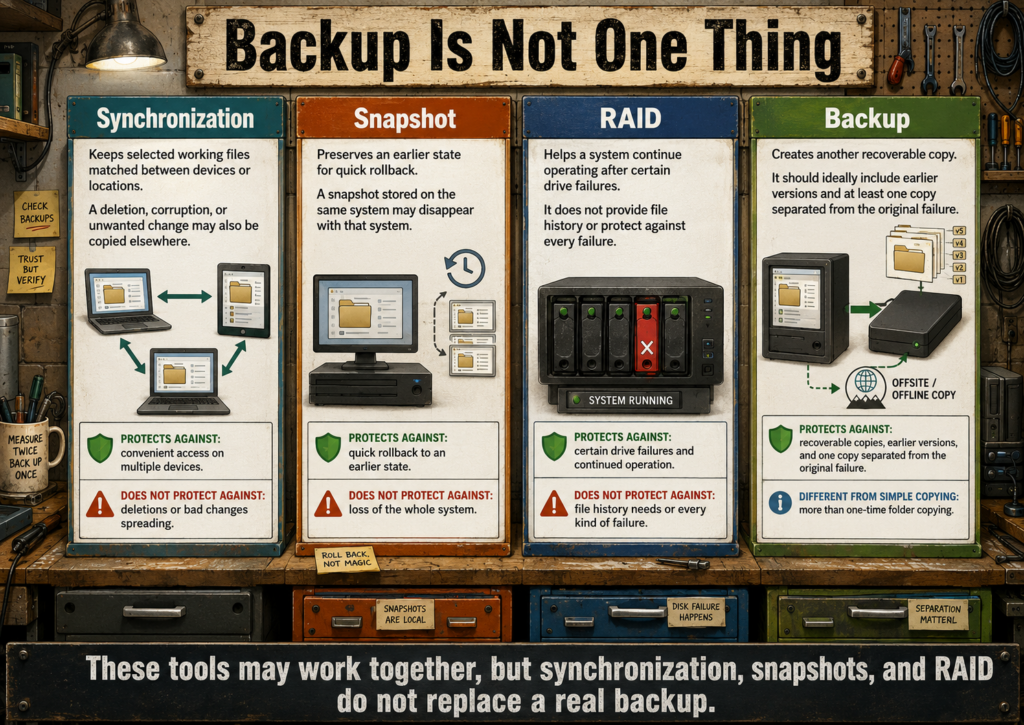
Synchronization
Synchronization keeps selected files matched between locations or devices. It is useful for availability and collaboration, but deletions, corruption, and unwanted changes may also be copied to the other location.
Snapshots
Snapshots preserve an earlier state of a filesystem, system, or dataset. They can make rollback fast, but snapshots stored on the same drive may disappear with that drive.
RAID
RAID can help a system continue operating after certain drive failures. It does not protect against deletion, malware, theft, fire, controller failure, filesystem damage, or mistakes copied across the array.
Backup
A backup creates another recoverable copy of information, ideally with earlier versions and at least one copy separated from the original system.
Synchronization, snapshots, and RAID may support a backup plan, but none of them replaces a real backup.
Start With the Failure You Need to Survive
- Accidentally changed or deleted a file: keep versioned backups or snapshots.
- Internal drive failed: keep a recoverable copy on a separate drive.
- Computer was stolen or destroyed: keep another copy away from the computer and its normal location.
- Ransomware or account compromise: keep at least one backup that is not continuously writable from the affected system.
- Server application failed: preserve the database, uploaded files, configuration, secrets, and documented restore process.
- Operating-system update broke the machine: use system snapshots or an image in addition to personal-file backups.
Choose a Desktop Backup Tool
Déjà Dup
Choose Déjà Dup when a straightforward scheduled desktop backup with encryption and restoration through a graphical interface is the priority.
Pika Backup
Choose Pika Backup when you want a friendly graphical interface powered by BorgBackup, especially on a Linux desktop.
- Good for: home folders, documents, photographs, project folders, and ordinary personal files.
- Check exclusions: make sure important hidden files, configuration, and application data are not omitted accidentally.
- Keep the backup destination separate: another folder on the same physical drive does not protect against drive failure.
Choose a Scriptable Backup Tool
Restic
Choose Restic when encrypted, deduplicated, versioned backups must run through scripts, timers, remote storage, or repeatable server workflows.
BorgBackup
Choose BorgBackup when efficient deduplicated archives, compression, pruning, and established Linux backup workflows fit the environment.
- Both are appropriate for: scheduled server backups, encrypted repositories, retention policies, and preserving many versions efficiently.
- Choose based on the complete workflow: repository location, remote support, tooling, documentation, monitoring, and the administrator’s ability to restore.
- Protect repository credentials: encryption passwords and keys are part of the recovery system.
Use rsync Carefully
rsync is excellent for efficient file copying and synchronization. It can also reproduce deletions and mistakes very efficiently.
- Good for: controlled copies, mirrors, migrations, staging directories, and clearly understood synchronization jobs.
- Use preview mode: inspect a dry run before using deletion or overwrite options.
- Add versioning elsewhere: a simple mirror may contain only the newest state and therefore preserve no earlier copy.
- Verify source and destination: reversing them can overwrite the wrong location.
System Snapshots and Full-Drive Images Solve Different Problems
Timeshift
Choose Timeshift when you want operating-system snapshots that can help reverse a broken update, configuration change, or system-level mistake.
- Good for: system files, installed software state, and configuration recovery.
- Not for personal files: documents, photographs, projects, and other user data still need separate backups.
- Keep snapshots separate when possible: snapshots on the same failed drive may be unavailable when needed most.
Rescuezilla and Clonezilla
Choose a whole-drive imaging tool when you need to preserve or duplicate an entire disk, including partitions, boot information, operating system, applications, and data.
- Good for: migrations, pre-upgrade safety images, lab systems, hardware replacement, and restoring a complete machine state.
- Rescuezilla: provides a more approachable graphical workflow.
- Clonezilla: offers powerful imaging and cloning options with a more technical interface.
- Do not rely on one old image forever: it may contain obsolete software, stale credentials, or outdated user data.
Check Drive Health Before Trusting the Storage
Drive-health tools can reveal warning signs, test results, temperature, power-on history, and error counts. They cannot guarantee that a drive will remain healthy tomorrow.
smartmontools
Choose smartmontools when command-line checks, scheduled tests, scripting, remote administration, and detailed drive information are needed.
GSmartControl
Choose GSmartControl when you want a graphical way to inspect SMART information and launch supported drive self-tests.
- Check new-to-you drives: especially salvaged, used, or repurposed hardware.
- Watch changes over time: one reading is less useful than a pattern of increasing errors or worsening health.
- Replace first, investigate second: when important data is at risk and the drive shows serious warning signs.
Partitioning Tools Can Destroy Data Quickly
GParted and KDE Partition Manager are useful for creating, resizing, moving, labeling, and inspecting partitions. These operations change the structure of a disk and can cause data loss if the wrong device or partition is selected.
- Identify the disk by more than size: verify model, serial number, labels, mount points, and existing filesystems.
- Unmount filesystems first: follow the tool’s requirements before changing partition boundaries.
- Back up before resizing: even routine-looking operations may fail because of power loss, hardware problems, or filesystem damage.
- Do not experiment on the only copy: use disposable or fully backed-up media for learning.
Recovery Tools Are the Last Resort
TestDisk
Choose TestDisk when partition information, boot structures, or filesystem access may be damaged and a technical recovery attempt is appropriate.
PhotoRec
Choose PhotoRec when files must be recovered by scanning raw storage for recognizable file patterns. Recovered files may lose original filenames, folders, and metadata relationships.
- Stop writing to the damaged device: new data may overwrite recoverable material.
- Recover to another drive: never write recovered files back onto the source being examined.
- Clone unstable media first: repeated reads may worsen a failing drive.
- Prefer backup over recovery: recovery tools are uncertain, slow, and often incomplete.
Ventoy: Reusable Boot and Recovery Media
Choose Ventoy when one USB drive should hold several Linux installers, rescue environments, diagnostic tools, and recovery images without being rewritten for every ISO.
- Useful for: installers, live systems, partition tools, cloning tools, password recovery, and hardware diagnostics.
- Keep the images current: old rescue media may lack drivers, security fixes, or compatibility with newer hardware.
- Label the drive: make its purpose clear so it is not reformatted or mistaken for ordinary storage.
Plan Storage Around Data, Not Empty Drive Bays
- Separate replaceable from irreplaceable data: downloaded media and caches may not need the same protection as family photographs or project records.
- Leave free space: databases, thumbnails, updates, snapshots, temporary files, and logs all need working room.
- Use meaningful labels and mount points: storage should remain understandable after reboot, migration, or hardware replacement.
- Record the filesystem: recovery and compatibility options differ between filesystems.
- Do not combine every role automatically: operating system, active data, backup, and removable archives may deserve separate devices.
A Practical Backup Pattern
- Working copy: the files currently used on the computer or server.
- Local backup: fast recovery from a separate drive or storage system.
- Separated backup: another copy protected from theft, fire, electrical damage, ransomware, or a mistake affecting the main location.
- Version history: enough earlier copies to recover from a problem discovered days or weeks later.
- Restore test: proof that files, databases, and complete services can actually be recovered.
The familiar “3-2-1” idea—three copies, on two kinds of storage, with one copy elsewhere—is a useful starting principle rather than a magic formula. The real plan should match the failures the data must survive.
Test the Restore, Not Just the Backup Job
- Restore several ordinary files to a temporary location.
- Open restored documents, photographs, archives, and media.
- Verify filenames, dates, permissions, ownership, and directory structure.
- Restore a database into a test instance and confirm that the application can use it.
- Record the exact commands, credentials, keys, and storage locations required for recovery.
- Repeat restore tests after major software, storage, or backup-policy changes.
A backup is only a claim until a restore proves it.
Media, Books, and Offline Libraries
- VLC and MPV: local video and audio playback. Beginner to intermediate, depending on the player and interface.
- Strawberry, Elisa, or MusicBrainz Picard: local music listening and library organization. Beginner to intermediate.
- Calibre: ebook organization, conversion, reading, and device transfer. Beginner to intermediate.
- Kiwix: read downloadable archives such as Wikipedia and other knowledge collections without a live connection. Beginner.
- Komga or Kavita: private comic, manga, and ebook library servers. Intermediate to advanced.
- Marble and offline OpenStreetMap tools: local map and geographic reference options. Beginner to intermediate, depending on the map data and offline setup.
Local Player, Desktop Library, or Shared Media Server?
- Use a local player: when one person simply needs to open a video, audio file, stream, disc image, or playlist.
- Use a desktop library: when one person wants organized music, books, photographs, or media on one computer.
- Use a shared server: when several people or devices need accounts, browsing, progress tracking, streaming, or one central library.
- Use an offline archive: when important reference material should remain available without an internet connection.
Begin with local files and ordinary applications. A server earns its place when the same collection must be available to several users or devices and someone is prepared to maintain it.
Choose a Local Media Player
VLC
Choose VLC when you want an approachable general-purpose player with broad format support, playlists, subtitles, discs, network streams, and a familiar graphical interface.
- Good for: ordinary desktop playback, testing media files, subtitles, simple conversions, and opening unusual formats.
- Start here: when you need one dependable player and do not have a specialized workflow.
MPV
Choose MPV when lightweight playback, keyboard control, scripting, high-quality rendering, command-line use, or integration into another application matters more than having a conventional media-library interface.
- Good for: advanced playback control, scripts, custom front ends, automation, and minimal desktop environments.
- Choose VLC instead: when a traditional graphical interface is more comfortable.
Choose a Music Library Tool
Elisa
Choose Elisa when you want a clean KDE music player that scans an ordinary local collection and provides straightforward album, artist, and playlist browsing.
Strawberry
Choose Strawberry when library management, playlists, format support, tagging, internet radio, and more detailed playback controls are useful.
MusicBrainz Picard
Choose MusicBrainz Picard when the real problem is inconsistent metadata rather than playback. It can identify releases and help standardize artist, album, track, date, and other tags.
- Work on a copy first: automated tagging can rename files and change metadata across a large collection.
- Review uncertain matches: compilations, rare releases, bootlegs, and personal recordings may be identified incorrectly.
- Use consistent folders: metadata helps applications, but the files should remain understandable outside the music player.
Choose a Book and Document Library
Calibre
Choose Calibre when one person needs to organize ebooks, edit metadata, convert supported formats, read books, and transfer files to compatible devices.
- Good for: personal ebook collections, metadata cleanup, format conversion, covers, series, and device transfer.
- Preserve originals: conversion may alter layout, fonts, images, tables, or navigation.
- Back up the library folder: books, covers, metadata, and Calibre’s database belong together.
Kavita or Komga
Choose Kavita or Komga when several users or devices need a private browser-based library for comics, manga, and supported ebook formats.
- Consider Kavita: when ebooks, comics, manga, reading progress, and a broader mixed library are important.
- Consider Komga: when comics and manga are the central collection and its library model fits the files.
- Use Calibre instead: when one person mainly needs desktop organization, conversion, and device transfer.
- Keep source folders orderly: filenames, series names, volume numbers, and folder structure affect scanning and identification.
Build an Offline Reference Library
Kiwix
Choose Kiwix when reference collections such as Wikipedia, manuals, educational material, or other supported archives should remain searchable without a live internet connection.
- Good for: travel, unreliable connections, classrooms, emergency references, local networks, and preserved knowledge collections.
- Check the archive date: offline information does not update itself and may become obsolete.
- Plan storage: large language editions and media-rich archives can require substantial disk space.
- Keep source details: record where the archive came from, its date, language, scope, and update process.
Offline Maps
Choose Marble or another offline OpenStreetMap-compatible tool when maps, routes, or geographic reference should remain available without depending entirely on a live commercial mapping service.
- Download the required area in advance: offline capability depends on local map data being present.
- Check routing support: viewing maps offline and calculating routes offline may require different data and components.
- Update periodically: roads, addresses, businesses, access restrictions, and boundaries change.
When Jellyfin Belongs in the Media Plan
Jellyfin belongs here when a household or small group needs one shared movie, television, music, or home-video library across televisions, browsers, phones, tablets, and computers.
- Choose Jellyfin: when accounts, watch progress, metadata, remote controls, streaming, and several clients are genuinely useful.
- Choose VLC or MPV instead: when one person is playing local files from one computer.
- Prefer direct play: compatible media and clients reduce processor and graphics demands.
- Plan transcoding carefully: incompatible formats, subtitles, bandwidth, and client limitations may force real-time conversion.
- Back up configuration separately: media files may be replaceable, while watched status, collections, users, playlists, and custom metadata may not be.
Metadata Helps, but the Files Must Stand on Their Own
Media applications build indexes containing titles, covers, tags, descriptions, progress, playlists, and search information. That database makes a collection pleasant to use, but it should not be the only thing that makes the files understandable.
- Use meaningful filenames and folders.
- Preserve original metadata when possible.
- Keep manually created covers, subtitles, descriptions, and sidecar files with the related media.
- Document which information is downloaded automatically and which must be backed up.
- Test whether the collection can be scanned successfully into a fresh application instance.
Ownership, Access, and Redistribution
Software that organizes or streams media does not grant rights to copy, download, share, or redistribute the material inside the library.
- Keep media obtained through lawful purchases, licenses, public-domain sources, personal creation, or other authorized means.
- Check whether a purchase provides a reusable file or only access through a particular account or application.
- Do not assume that personal access permits public sharing or bundling with another product.
- Record licenses for public-domain, Creative Commons, open-source, and freely redistributable collections.
- Respect the privacy of personal photographs, recordings, family videos, and user viewing history.
Before Importing a Large Library
- Test the application with a small disposable sample.
- Decide on folders, filenames, metadata, series naming, and duplicate handling.
- Find where the application stores its database, covers, thumbnails, cache, and settings.
- Estimate the storage required for originals, generated previews, downloads, and backups.
- Confirm how the library will be moved or rebuilt on another computer.
- Back up irreplaceable source files before allowing automated renaming, tagging, conversion, or organization.
Privacy and Security
- Firefox and privacy-focused Firefox derivatives: configurable browser choices with different defaults and maintenance models. Beginner to intermediate.
- uBlock Origin: browser content filtering. Beginner.
- Bitwarden or KeePassXC: password management using hosted, self-hosted, or local vault approaches. Beginner to advanced, depending on synchronization and self-hosting.
- VeraCrypt and LUKS: encrypted containers or full-disk encryption for different systems. Intermediate to advanced.
- OpenSnitch: application-level outgoing network control on Linux. Intermediate.
- Metadata Cleaner or ExifTool: inspect or remove embedded metadata before sharing files. Beginner to intermediate, depending on the tool.
- UFW, firewalld, and nftables: firewall tools ranging from simpler interfaces to direct rule management. Intermediate to advanced.
Security tools are not magic shields. Updates, unique passwords, backups, careful exposure of services, and knowing what is running matter more than collecting impressive-sounding utilities.
Start With the Basic Security Habits
Security begins with a system that is understood, updated, backed up, and limited to the services people actually use. Specialized tools can strengthen that foundation, but they cannot replace it.
- Install updates: keep the operating system, browser, applications, plugins, containers, and server software current.
- Use unique passwords: one compromised account should not unlock several others.
- Enable multifactor authentication: especially for email, password managers, financial accounts, hosting, domain names, and remote administration.
- Remove unused software and services: anything running may need updates, permissions, storage, and attention.
- Limit remote access: expose only what must be reachable, and keep administration private when possible.
- Maintain recoverable backups: security also means being able to recover from mistakes, malware, theft, and hardware failure.
Choose a Password Manager
KeePassXC: Local Encrypted Vault
Choose KeePassXC when you want an encrypted password database stored as a file under your own control.
- Good for: one person, local-first use, offline access, and users comfortable managing their own vault file.
- Synchronization is separate: the vault may be copied through Syncthing, Nextcloud, removable storage, or another trusted method.
- Avoid simultaneous edits: changing the same vault on several devices may create conflicts.
- Back up the vault: keep several recoverable copies and preserve any required key file separately.
Bitwarden: Managed Synchronization Across Devices
Choose Bitwarden when convenient synchronization, browser integration, mobile access, and shared vault features are worth using a hosted account or managed service. Individual users should assume that a forgotten master password cannot be recovered unless an appropriate recovery method, such as Emergency Access, has been configured in advance.
- Good for: users who need dependable access across several devices.
- Use a strong master password: it protects access to many other accounts.
- Enable multifactor authentication: protect the password-manager account itself.
- Prepare for lockout: store recovery codes safely, configure any desired emergency-access method beforehand, and keep an independent record of the recovery procedure.
Self-Hosted Vaultwarden
Vaultwarden is an unofficial, community-maintained implementation of the Bitwarden client API. It works with official Bitwarden clients but has a separate support path and may require prompt updates when client behavior changes. Choose it only when Bitwarden-compatible synchronization is useful and the server can be maintained, protected, monitored, backed up, and restored confidently.
Self-hosting a password service increases control but also makes local power, network, storage, updates, certificates, backups, and recovery part of the security system.
Choose Encryption by What Must Be Protected
LUKS: Encrypt a Linux Disk or Partition
Choose LUKS when a Linux system drive, data drive, or partition should remain unreadable without the correct passphrase or key.
- Good for: laptops, removable drives, workstation storage, and server disks containing private data.
- Protects data at rest: once the filesystem is unlocked, authorized software and users may access it normally.
- Preserve recovery details: forgotten passphrases and lost keys can make the data permanently inaccessible.
VeraCrypt: Portable Encrypted Containers and Volumes
Choose VeraCrypt when an encrypted container, removable volume, or cross-platform storage arrangement fits the workflow.
- Good for: selected private files, removable storage, and encrypted volumes that may move between supported systems.
- Do not forget backup: encryption protects confidentiality, not availability.
- Test recovery: confirm that the volume can be opened from another suitable machine before trusting it with the only copy.
Encryption does not protect an unlocked system from malware, account misuse, accidental deletion, or an attacker who already has access. It primarily protects stored data when the device or volume is locked.
Browser Privacy Begins With Fewer Unnecessary Connections
Firefox and Firefox-Based Browsers
Choose Firefox when you want a broadly supported browser with configurable privacy controls and a large extension ecosystem. Privacy-focused derivatives may change defaults, remove integrations, or harden settings, but they can also have different update and compatibility models.
- Use a maintained browser: prompt security updates matter more than an impressive list of privacy switches.
- Limit extensions: every extension receives some level of access and creates another update dependency.
- Separate sensitive activities when useful: profiles or containers can reduce accidental mixing of accounts and browsing contexts.
- Do not assume private browsing creates anonymity: it mainly limits local history and storage after the session ends.
uBlock Origin
Choose uBlock Origin when you want efficient browser-level filtering of advertisements, trackers, malicious domains, and other unwanted page resources.
- Start with the default filter lists: aggressive custom rules can break websites and become difficult to maintain.
- Allow exceptions deliberately: relax blocking only where a site genuinely requires it and deserves trust.
- Remember its limits: browser filtering does not secure the operating system, accounts, network, or files.
Choose a Firewall by Who Must Maintain It
A firewall controls which network connections are allowed. It is most useful when the rules are simple enough to inspect and maintain. A complicated firewall nobody understands can create both security gaps and difficult outages.
UFW
Choose UFW when a straightforward command-line interface for common Linux firewall rules is enough.
- Good for: desktops, small servers, and simple allow-or-deny policies.
- Start with denial of unsolicited inbound traffic: then allow only the services the machine actually provides.
- Verify remote access first: do not lock yourself out of a machine you cannot reach physically.
firewalld
Choose firewalld when zones, changing network roles, graphical tools, or integration with distributions that use it by default fit the environment.
nftables
Choose nftables directly when detailed rule control, advanced networking, or a carefully documented custom firewall is required.
Do not replace a working simple firewall with a more advanced one merely because the lower-level tool is more powerful.
OpenSnitch: Control Outgoing Application Connections
Choose OpenSnitch when you need visibility into which Linux applications are making outgoing network connections and want the option to allow or block them by rule.
- Good for: investigating unexpected connections, limiting selected applications, and learning how software communicates.
- Expect decisions: modern applications contact many servers for updates, fonts, media, login, telemetry, and content.
- Avoid blind blocking: denying unfamiliar traffic may break updates, authentication, synchronization, or normal application functions.
- Use understandable rules: temporary prompts should become documented policies rather than an endless stream of guesses.
Remove Metadata Before Sharing When It Matters
Images, office documents, PDFs, audio files, and other media may contain embedded information such as names, software versions, camera details, dates, comments, editing history, and location coordinates.
Metadata Cleaner
Choose Metadata Cleaner when you want a graphical workflow for inspecting and removing common metadata before sharing files.
ExifTool
Choose ExifTool when detailed inspection, scripting, batch processing, or support for many metadata formats is required.
- Work on a copy: metadata may include useful dates, copyright, captions, orientation, and organization details.
- Check the final export: applications may add new metadata after the source file was cleaned.
- Do not rely on metadata removal alone: visible content may still reveal locations, names, account information, faces, reflections, or identifying details.
Remote Access Should Be Narrow and Intentional
- Prefer private-network access: use a VPN-style connection such as Tailscale or WireGuard for administration and internal tools.
- Publish only designed public services: websites and selected applications should be exposed through documented routes and authentication.
- Keep management interfaces private: container dashboards, databases, monitoring, storage controls, and administrative panels rarely belong on the public internet.
- Disable unused access: old accounts, open ports, temporary tunnels, and forgotten test services create unnecessary risk.
- Record the path: know which router, firewall, tunnel, proxy, certificate, domain, and application settings make remote access possible.
Privacy Claims Require the Whole Data Path
A tool may be open source, local, encrypted, private, anonymous, or self-hosted in one part of its design while still depending on outside accounts, telemetry, hosted search, remote APIs, synchronization providers, certificate authorities, or third-party infrastructure.
- Where is the data created?
- Where is it stored?
- Which devices and services can read it?
- Which outside systems receive requests, metadata, or content?
- How is it deleted, exported, backed up, and recovered?
- What stops working when the internet, provider, account, or subscription disappears?
Privacy depends on the complete workflow, not one reassuring label.
Security That People Can Actually Maintain
The strongest practical setup is usually not the one with the most tools. It is the one whose users can follow the rules, recover their accounts, recognize failures, install updates, and restore their data.
- Use clear names for devices, accounts, services, and backup destinations.
- Keep recovery codes and emergency instructions somewhere dependable.
- Avoid security steps that silently depend on one person’s memory.
- Document why unusual firewall, browser, encryption, or account settings exist.
- Review access after people, devices, projects, or services change.
- Prefer a smaller system that receives updates and backups over a complicated system that is gradually abandoned.
A Practical Security Review
- List the software and network services currently running.
- Remove applications, accounts, extensions, and services no longer used.
- Install available security updates.
- Confirm that important accounts use unique passwords and multifactor authentication.
- Check which ports and management interfaces are reachable from outside the trusted network.
- Review firewall rules, remote-access tools, tunnels, proxy routes, and certificates.
- Restore selected files and application data from backup.
- Record unresolved risks and the next practical improvement instead of pretending the system is perfectly secure.
DPD-Tested and DPD-Used Tools
The following status groups describe DPD’s current level of hands-on experience. They are records of actual use, not permanent endorsements.
- Used in production: Kubuntu, Debian, Docker, Docker Compose, WordPress, MariaDB, PostgreSQL, Nextcloud, Ollama, Open WebUI, Kokoro TTS, digiKam, GIMP, Inkscape, Git, and Cloudflare Tunnel.
- Used in a project: ComfyUI, Obsidian, and Agent OS by Builder Methods.
- Tested: pgAdmin and several backup, partitioning, drive-health, imaging, and disk-recovery tools.
- Under evaluation: Nginx Proxy Manager and Beszel.
That list will change as tools are tested, replaced, improved, or found unsuitable. The goal is to document what happened honestly—not to declare a permanent winning stack.
What DPD-Tested Means
DPD-tested means that the software has been installed, used, configured, repaired, compared, or documented in a real DPD project or system. The depth of that testing varies. Some tools are part of daily production work, while others were evaluated for a specific task, experiment, or possible future use.
- Used in production: relied upon for active work or a running service.
- Used in a project: applied to a real task, build, migration, or workflow.
- Tested: installed and examined closely enough to document useful behavior, limitations, or requirements.
- Under evaluation: promising, but not yet trusted as a standard DPD choice.
- Replaced or rejected: tested but found unsuitable for the particular hardware, users, maintenance level, or project goals.
A tool can be good software and still be the wrong fit for a particular machine or person. Likewise, a tool that works well for DPD may depend on hardware, experience, or maintenance that another user does not have.
How to Use the DPD Experience
- Use DPD notes to understand the installation, storage, maintenance, and recovery work involved.
- Compare the DPD hardware and use case with your own before copying a setup directly.
- Treat documented problems and rejected tools as useful results, not failed work.
- Check whether the software or instructions have changed since the DPD test was performed.
- Test important choices with disposable data before depending on them.
The purpose of documenting real systems is not to create a list of approved brands. It is to make the cost, value, limitations, and recovery path visible enough for someone else to make a better decision.
Choosing Without Getting Buried
Answer these questions before choosing a tool. Once one candidate has been selected, use the Installation Ladder below to test and adopt it safely.
- What job must be solved? “I need notes available offline” is easier to solve than “I need a second brain.”
- Who and how many devices need it? One person on one computer may need a desktop application, while several users or devices may justify synchronization or a shared service.
- Where will the important information live? Identify whether the tool uses ordinary files, an application database, server storage, container volumes, or an outside account.
- What ongoing work will it require? Consider accounts, updates, storage, electricity, networking, security, troubleshooting, backups, and recovery.
- What dependence is acceptable? Decide how much the arrangement may rely on a provider, subscription, internet connection, special file format, plugin, or one knowledgeable administrator.
- Can the information leave safely? Know how to export, move, or recover the important data before committing years of work.
The Installation Ladder
Use this sequence before turning a promising application into part of the permanent system.
- Name the job. Describe the result the software must provide.
- Choose one candidate. Avoid installing several overlapping tools before understanding any of them.
- Test with disposable data. Learn what the tool changes, creates, imports, and deletes.
- Find the data. Locate files, databases, configuration, accounts, logs, caches, and generated output.
- Prove the backup. Create a recoverable copy and test restoring it.
- Document the setup. Record installation, versions, storage, updates, access, and recovery.
- Add complexity only when needed. Plugins, servers, automation, remote access, and integrations should each solve a visible problem.
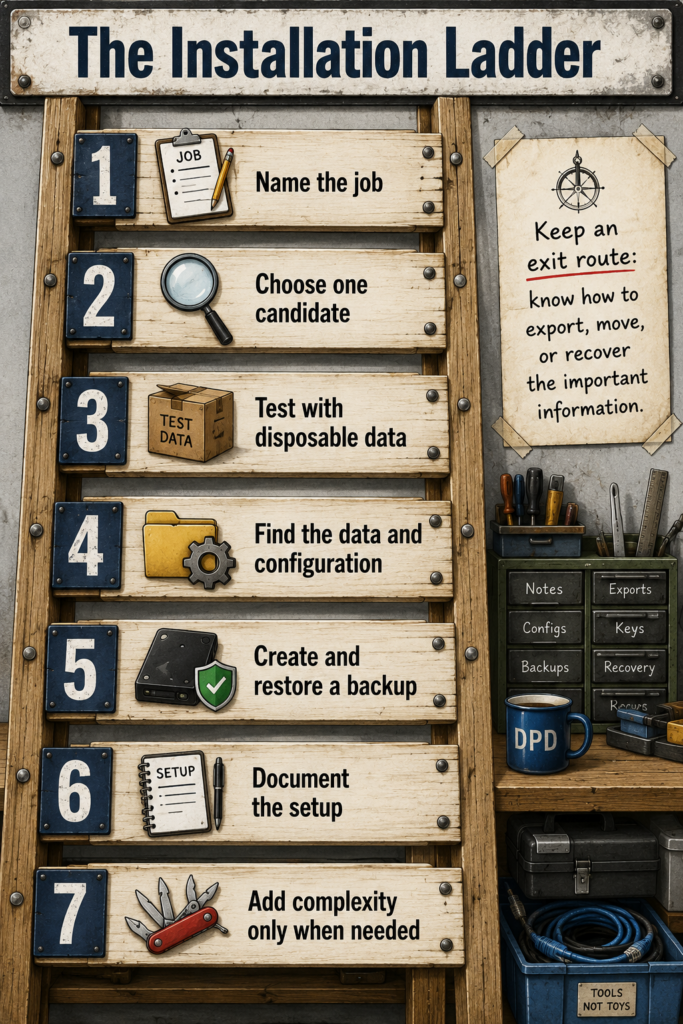
A good toolbox is not the one with the most tools. It is the one where you can find, understand, repair, and replace the tool you actually need.