

MT Server has reached another useful milestone: the current guided installer is being tested on real hardware, and the test run now reaches Step 5 of 5 — Installation.
That matters because the goal has never been simply to make MT Server installable. The goal is to make installing and setting up a server understandable to someone who does not already know how to administer Linux.
These latest test screens show where that work stands today.
Step 1: What Do You Want Your Server to Do?
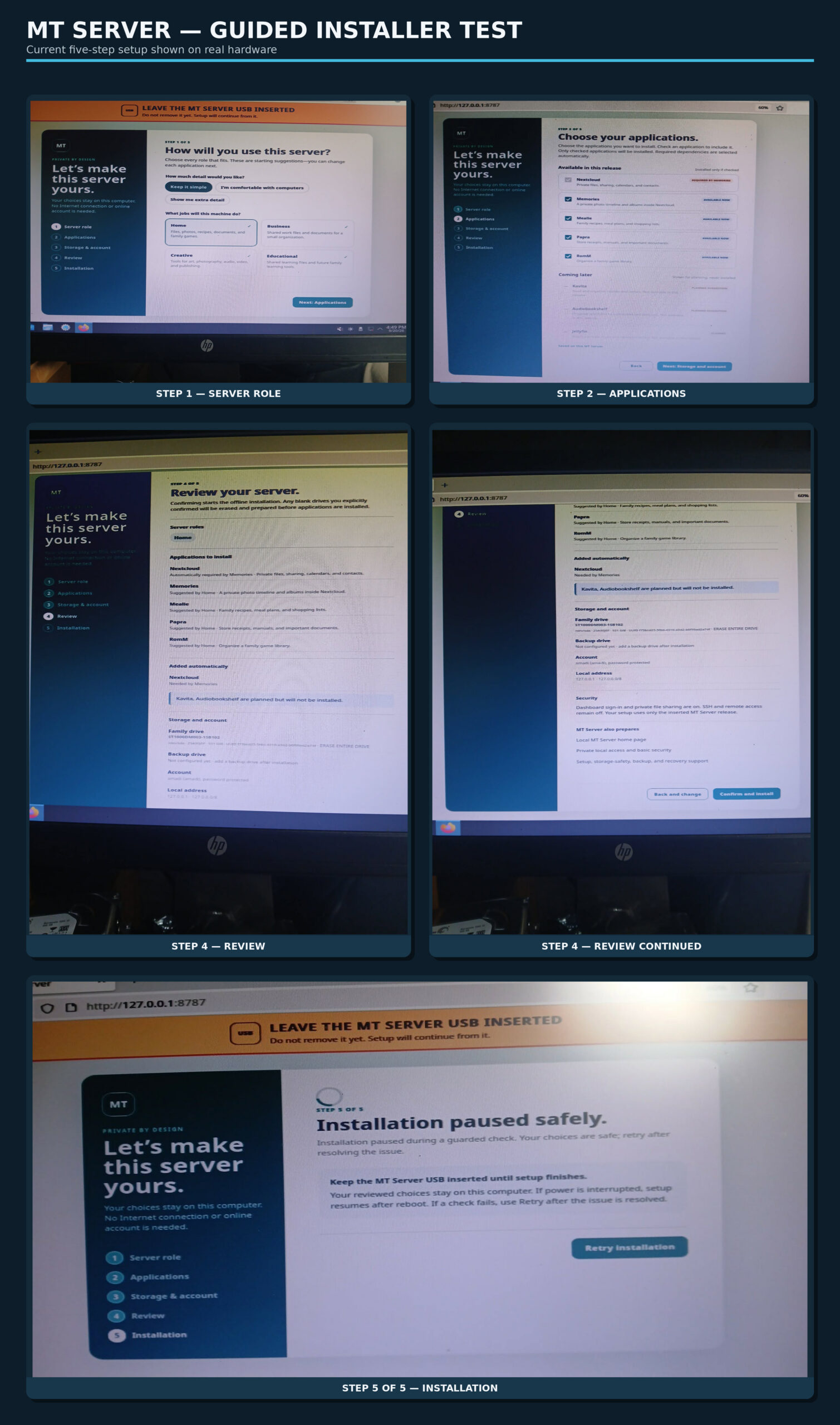
Instead of dropping the user into a technical package list, MT Server starts with understandable roles such as Home, Business, Creative, and Educational. Those choices give the installer a sensible starting point while still allowing the user to decide what actually goes onto their machine.
That is an important part of the MT Server idea: the computer should adapt to what the person wants to do, rather than requiring the person to understand the underlying server architecture first.
Step 2: Choose Your Applications
The next step lets the user choose the applications they want. MT Server uses recognizable, established applications and explains what they do in plain language.
We are also refining how application dependencies are presented so the installer can handle relationships between applications automatically without making the selection screen confusing.
The aim is simple: you should be able to decide what you want your server to do without first learning what every package, container, or dependency means.
Steps 3 and 4: Storage, Account, and Review
Before anything is installed, MT Server shows the user what they selected and gives them a chance to review the setup.
Testing this on an actual machine has already helped expose the small details that are easy to miss during development: wording, screen fit, clearer labels, how selected roles are displayed, and whether the information shown is actually useful to the person sitting in front of the computer.
Those details matter. A guided installer is only useful if the guidance is clear.
Step 5 of 5: Installation
The latest test made it through the complete guided setup and into Step 5 of 5 — Installation.
The screenshot also shows what happens when one of the installer’s guarded checks needs attention.
Instead of throwing away the setup or forcing the user to start over, MT Server pauses the installation safely and keeps the choices that have already been made. The issue can be corrected and the installation retried.
The installer also reminds the user to leave the MT Server USB inserted because setup continues from it.
That behavior is working. The test also showed us where Step 5 needs to become much more informative.
What We’re Working on Next
The biggest immediate improvement is the installation screen itself.
Instead of only showing a general “Installing” message, Step 5 will show what the installer is actually doing:
- which installation tasks have already completed
- which task is currently running
- what remains
- exactly which task failed if something needs attention
- the last successfully completed step
- what the Retry button is actually retrying
We are also adding a persistent installation log.
That log will record things such as timestamps, installation steps, attempted actions, results, errors, retry attempts, and the last successful task. If something goes wrong, we should be able to find out exactly where and why — including after a reboot.
That information can stay out of the way for someone who simply wants the installation to work, while still being available when we need to diagnose a problem.
The next rounds of testing will continue tightening the installer layout and wording, improving Step 5 progress and error reporting, and running complete installations on real hardware.
We are not at the finish line yet.
But these screenshots show something important: MT Server now has a complete five-step guided setup that can take a user from “What do I want this server to do?” all the way to the actual installation process.
A useful server you can own, understand, and set up without first becoming a server administrator.