

You don’t need a $2,000 server rack to fire the data monsters. In fact, for the independent builder, the best hardware isn’t found in a glossy catalog—it’s found in the “legacy” piles of enterprise graveyards.
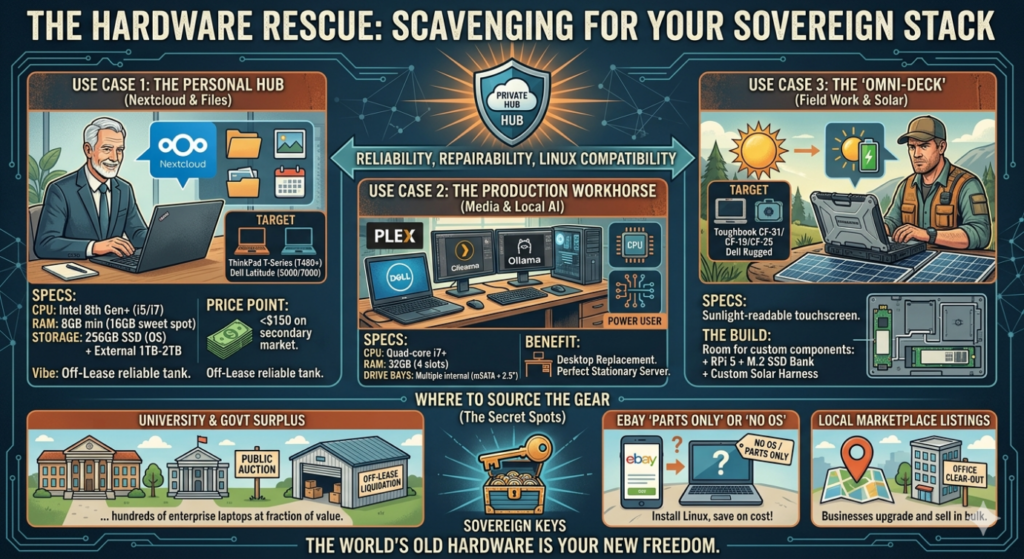
To start your journey into independent computing, you need to look for reliability, repairability, and Linux compatibility. Here is your field guide to finding the right gear for the right price.
The Gold Standard: Why Legacy Enterprise?
Modern consumer laptops are built like smartphones: glued shut, soldered shut, and designed to be replaced in three years. Legacy Enterprise gear (Dell Precision, Lenovo ThinkPad, Panasonic Toughbook) was built to be serviced. They have magnesium alloy frames, standardized screws, and a massive supply of cheap replacement parts on the secondary market.
Use Case 1: The Personal “Hub” (Nextcloud & Files)
If you just want to get away from Google Workspace and host your own files, photos, and calendars.
- The Target: Dell Latitude (5000/7000 series) or Lenovo ThinkPad T-Series (T480 or newer).
- The Specs: * CPU: Intel 8th Gen (i5 or i7) or newer (for better power efficiency).
- RAM: 8GB minimum (16GB is the sweet spot).
- Storage: 256GB SSD for the OS + an external 1TB-2TB drive for data.
- Finding it cheap: Look for “Off-Lease” units on eBay or local surplus. You can often find a rock-solid T480 for under $150. These are tanks that run Linux Mint or Ubuntu like a dream.
Use Case 2: The Production Workhorse (Media & Local AI)
If you plan on running a Plex media server, managing a business, or dipping your toes into local AI.
- The Target: Dell Precision M4800 / 7510 or HP ZBook.
- The Specs:
- CPU: Quad-core i7.
- RAM: 32GB (these machines usually have 4 slots).
- Drive Bays: Look for machines with multiple internal bays (mSATA + 2.5″ SSD).
- The Benefit: These are “Desktop Replacements.” They were $3,000 workstations in their day. Now, they are the perfect stationary server for your home office.
Use Case 3: The “Omni-Deck” (Field Work & Solar)
If you need a system that survives the real world—spills, drops, and outdoor sunlight.
- The Target: Panasonic Toughbook (CF-31 / CF-19 / CF-25) or Dell Rugged.
- The Specs: Look for “Touchscreen” models with sunlight-readable displays.
- The Build: This is where your Raspberry Pi 5 or M.2 SSD bank comes in. These chassis are massive and have enough internal room to house extra cooling or even a custom solar harness.
Where to Source the Gear (The “Secret” Spots)
- University & Government Surplus: Most major universities and city governments have “Surplus Property” departments. When they upgrade their IT departments, they sell off hundreds of enterprise-grade laptops and PCs at a fraction of their value. Check their websites for public auction dates or “cash-and-carry” warehouse days.
- eBay “Parts Only” or “No OS”: Many sellers list laptops as “broken” simply because they don’t have an operating system or a charger. Since you’re installing Linux anyway, these are gold mines.
- Local Marketplace Listings: Watch for “office clear-outs.” When a small business closes or upgrades, they often sell their “old” gear in bulk just to get it out of the building.
Final Pro-Tip: The “Click-Click-Done” Check
Before you buy, search the model name + “Linux” (e.g., “ThinkPad T480 Linux compatibility”). If the community says “everything works out of the box,” you’ve found your machine.
The world’s “old” hardware is your new freedom. Stop looking at the spec sheets of 2026 and start looking at the build quality of 2016. Your wallet—and your data—will thank you.